

Forex Trading
Exness Margin Requirements and How They Work
A practical guide to margin calculations and risk management on Exness

Senior Forex Trader & Market Analyst
Daniel Chen is an experienced forex trader and financial market analyst with over 15 years of experience in currency trading. He specializes in technical analysis, risk management, and developing practical trading strategies to help traders make informed decisions.
Margin is the collateral a broker requires to open and maintain leveraged positions. On Exness, margin rules vary by account type, instrument, and the leverage you select. Understanding these rules helps you avoid unexpected stop outs and plan position sizes that fit your risk tolerance.
Contents
- 1. What Is Margin in Forex Trading
- 2. Exness Margin Requirements by Account Type
- 3. How Leverage Affects Your Margin
- 4. Margin Calculation Examples
- 5. Stop Out Levels and Margin Calls
- 6. Managing Margin During High Volatility
- 7. Margin for Different Instrument Classes
- 8. Using the Exness Margin Calculator
- 9. Common Margin Mistakes to Avoid
- 10. Margin and Account Scaling
- 11. Margin in the Exness Mobile App
- 12. Final Assessment of Exness Margin
This guide covers how Exness calculates margin, the differences between Standard and Professional accounts, what happens when equity drops near the stop out level, and how to use the built-in margin calculator. You will also find practical examples for forex pairs, metals, indices, and crypto CFDs.
Exness offers leverage up to 1:2000 on certain accounts, but high leverage does not change the margin percentage required by the broker. It only changes how much notional exposure you can control with a given deposit. The margin percentage stays fixed per instrument and account tier.
What Is Margin in Forex Trading
Margin is not a fee or a transaction cost. It is a portion of your account balance set aside as collateral while a trade remains open. When you close the position, that margin returns to your free balance. The amount depends on the notional value of the trade and the margin rate assigned to the instrument.
Exness expresses margin rates as percentages. A 0.5% margin rate on EURUSD means you need $500 in margin to control a $100,000 position (one standard lot). The same position at 0.2% margin requires only $200. Lower margin rates mean higher effective leverage.
Free margin equals equity minus used margin. Equity is your balance plus or minus unrealized profit or loss on open positions. If floating losses reduce equity until it approaches used margin, free margin shrinks. When equity falls to the stop out level, Exness begins closing positions automatically.
Margin is a tool, not a target. Treat it as the minimum buffer between your account and a forced liquidation.
Exness Margin Requirements by Account Type
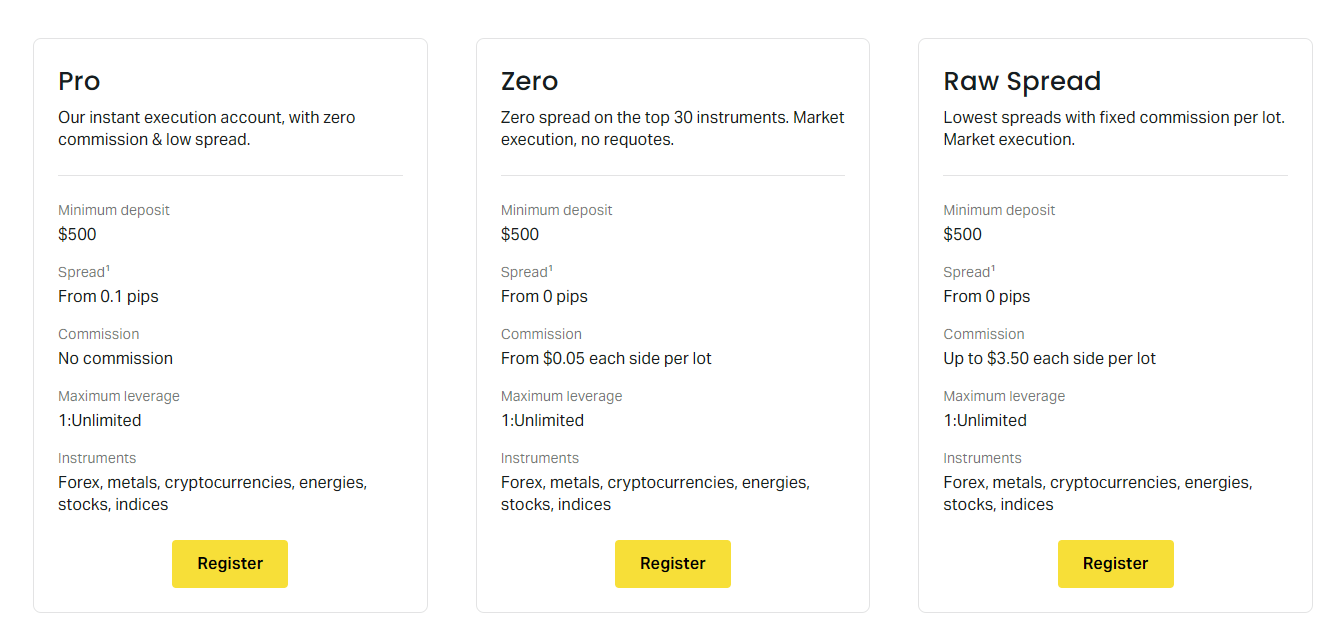
Exness groups accounts into Standard and Professional categories. Standard accounts include Standard and Standard Cent. Professional accounts include Raw Spread, Zero, and Pro. Each category has its own margin schedule, and the differences can be significant for the same instrument.
On Standard accounts, major forex pairs typically carry a 0.5% margin rate (1:200 leverage equivalent). Minor pairs and exotic pairs often require 1% to 3%. Gold (XAUUSD) is usually 1% on Standard accounts. Indices and energies range from 1% to 5% depending on the specific symbol.
Professional accounts generally offer lower margin rates. Raw Spread and Zero accounts often show 0.2% on major forex (1:500 equivalent) and 0.5% on gold. Pro accounts can go as low as 0.1% on majors (1:1000 equivalent) for clients who qualify. The exact rates appear in the contract specifications inside the Personal Area.
Scroll horizontally to see all columns
| Instrument Class | Standard Accounts | Professional Accounts |
|---|---|---|
| Major Forex (EURUSD, GBPUSD) | 0.5% | 0.1% - 0.2% |
| Minor Forex (EURGBP, AUDJPY) | 1% - 2% | 0.5% - 1% |
| Exotic Forex (USDTRY, EURZAR) | 3% - 5% | 2% - 3% |
| Gold (XAUUSD) | 1% | 0.5% |
| Silver (XAGUSD) | 2% | 1% |
| Major Indices (US30, US500) | 1% - 2% | 0.5% - 1% |
| Energies (UKOIL, USOIL) | 2% - 3% | 1% - 2% |
| Cryptocurrencies | 5% - 10% | 5% - 10% |
These figures are representative. Always check the current contract specification for the exact symbol you intend to trade. Exness updates margin requirements periodically, especially ahead of high-impact news events or during extreme volatility.
How Leverage Affects Your Margin
Leverage and margin are two sides of the same coin. Leverage expresses the ratio of notional exposure to required margin. Margin expresses the same relationship as a percentage. Exness lets you choose leverage from 1:1 up to 1:2000 depending on account type and equity.
Choosing 1:2000 leverage on a Standard account does not override the instrument margin rate. If EURUSD requires 0.5% margin, that equals 1:200 leverage. The platform will use the stricter of the two limits. In practice, the margin rate is the binding constraint for most instruments.
High leverage mainly matters for accounts with small balances. A $100 deposit at 1:2000 allows a maximum notional exposure of $200,000, but the 0.5% margin rate on EURUSD still caps each lot at $500 margin. You could open 400 micro lots (0.01 each) before hitting the margin limit.
- Leverage setting caps maximum position size by account equity
- Instrument margin rate caps position size by notional value
- The stricter limit always applies
- Changing leverage does not change margin percentage
- Professional accounts have higher leverage ceilings
Exness applies dynamic leverage rules based on account equity. As your balance grows, the maximum available leverage decreases. This is a risk management measure. For example, equity above $1,000 may cap leverage at 1:2000, while equity above $50,000 may cap it at 1:200. The exact thresholds are published in the leverage rules section.
Margin Calculation Examples
The basic formula is: Margin = Notional Value × Margin Rate. Notional value equals lots × contract size × current price. For forex, one standard lot is 100,000 units of the base currency. For gold, one lot is 100 ounces. For indices, contract sizes vary by symbol.
Example 1: Buy 0.5 lots EURUSD at 1.0850 on a Standard account (0.5% margin). Notional = 0.5 × 100,000 × 1.0850 = $54,250. Margin = $54,250 × 0.005 = $271.25. This is the amount locked from your free margin while the trade stays open.
Example 2: Sell 1 lot XAUUSD at 2,350 on a Raw Spread account (0.5% margin). Notional = 1 × 100 × 2,350 = $235,000. Margin = $235,000 × 0.005 = $1,175. The same trade on a Standard account at 1% margin would require $2,350.
Example 3: Buy 2 lots US500 at 5,200 on a Pro account (0.5% margin). Contract size for US500 is typically 1 × index price per lot. Notional = 2 × 5,200 = $10,400. Margin = $10,400 × 0.005 = $52. Index margin rates are often lower than forex on Professional accounts.
Scroll horizontally to see all columns
| Trade | Account Type | Margin Rate | Required Margin |
|---|---|---|---|
| 1 lot EURUSD @ 1.0800 | Standard | 0.5% | $540 |
| 1 lot EURUSD @ 1.0800 | Raw Spread | 0.2% | $216 |
| 0.1 lot XAUUSD @ 2300 | Standard | 1% | $230 |
| 0.1 lot XAUUSD @ 2300 | Zero | 0.5% | $115 |
| 5 lots US30 @ 39000 | Pro | 0.5% | $975 |
| 1 lot BTCUSD @ 65000 | Standard | 10% | $6,500 |
These examples assume the base currency is USD. If your account currency differs, Exness converts the margin amount at the current exchange rate. The conversion happens automatically and appears in the trade details panel.
Stop Out Levels and Margin Calls
Exness uses a stop out system rather than traditional margin calls. There is no warning call or notification that gives you time to add funds. When your margin level (equity ÷ used margin × 100%) reaches the stop out threshold, the platform begins closing positions automatically, starting with the largest losing position.
Standard accounts have a 0% stop out level. This means positions close when equity reaches zero. Professional accounts (Raw Spread, Zero, Pro) have a 20% stop out level. Positions begin closing when equity drops to 20% of used margin. The higher threshold on Professional accounts provides an earlier safety net.
Margin level is displayed in real time in MT4, MT5, and the Web Terminal. Watch it during volatile sessions. A margin level of 500% means equity is five times used margin. At 100%, equity equals used margin and free margin is zero. At 20% on a Pro account, the stop out triggers.
The 0% stop out on Standard accounts sounds generous but leaves no buffer. A single gap can wipe the account before you react.
Managing Margin During High Volatility
News events like NFP, CPI, central bank decisions, and geopolitical shocks can widen spreads dramatically. Wider spreads increase the unrealized loss on open positions instantly, dropping equity and margin level. Exness often raises margin requirements 24-48 hours before scheduled high-impact events.
During the Swiss franc unpegging in 2015 and the COVID crash in 2020, many brokers increased margin to 50% or 100% on affected pairs. Exness follows similar practices. The increased margin applies to new positions immediately and to existing positions after a grace period.
- Reduce position size ahead of major news
- Monitor the Economic Calendar in the Personal Area
- Keep free margin well above zero as a buffer
- Consider closing highly leveraged positions before weekends
- Check platform notifications for margin change alerts
Weekend gaps are a specific risk. Forex markets close Friday 22:00 UTC and reopen Sunday 22:00 UTC. If price gaps against you, the floating loss at open can trigger stop out before you can act. Crypto markets trade 24/7 but can see extreme moves on low liquidity weekends.
Margin for Different Instrument Classes
Forex majors have the lowest margin rates because they are the most liquid. Minors and exotics require more margin due to wider spreads and lower liquidity. Metals, especially gold, sit between majors and minors. Indices and energies vary by the underlying exchange hours and volatility.
Cryptocurrency CFDs carry the highest margin rates, typically 5% to 10% on Standard accounts and 5% to 10% on Professional accounts. The rates do not drop as much on Pro accounts because crypto volatility remains high regardless of account tier. Weekend margin on crypto can rise to 50% on some symbols.
Stock CFDs on Exness typically require 5% to 20% margin depending on the specific equity. Large-cap US stocks like Apple or Tesla are often at 5% to 10%. Smaller caps and non-US stocks can require 20% or more. Stock CFDs also have different trading hours tied to the exchange schedule.
Scroll horizontally to see all columns
| Asset Class | Standard Min | Standard Max | Pro Min | Pro Max |
|---|---|---|---|---|
| Forex Majors | 0.5% | 0.5% | 0.1% | 0.2% |
| Forex Minors | 1% | 2% | 0.5% | 1% |
| Forex Exotics | 3% | 5% | 2% | 3% |
| Precious Metals | 1% | 2% | 0.5% | 1% |
| Indices | 1% | 3% | 0.5% | 1.5% |
| Energies | 2% | 5% | 1% | 3% |
| Stock CFDs | 5% | 20% | 5% | 15% |
| Cryptocurrencies | 5% | 10% | 5% | 10% |
These ranges reflect typical conditions. Exness publishes the exact margin rate for each symbol in the contract specification. Open the Market Watch in MT4/MT5, right-click a symbol, and choose Specification to see the current rate.
Using the Exness Margin Calculator
Exness provides a web-based trading calculator that computes margin, pip value, swap, and profit for any position size. You select the account type, instrument, lot size, and leverage. The calculator shows required margin in your account currency instantly.
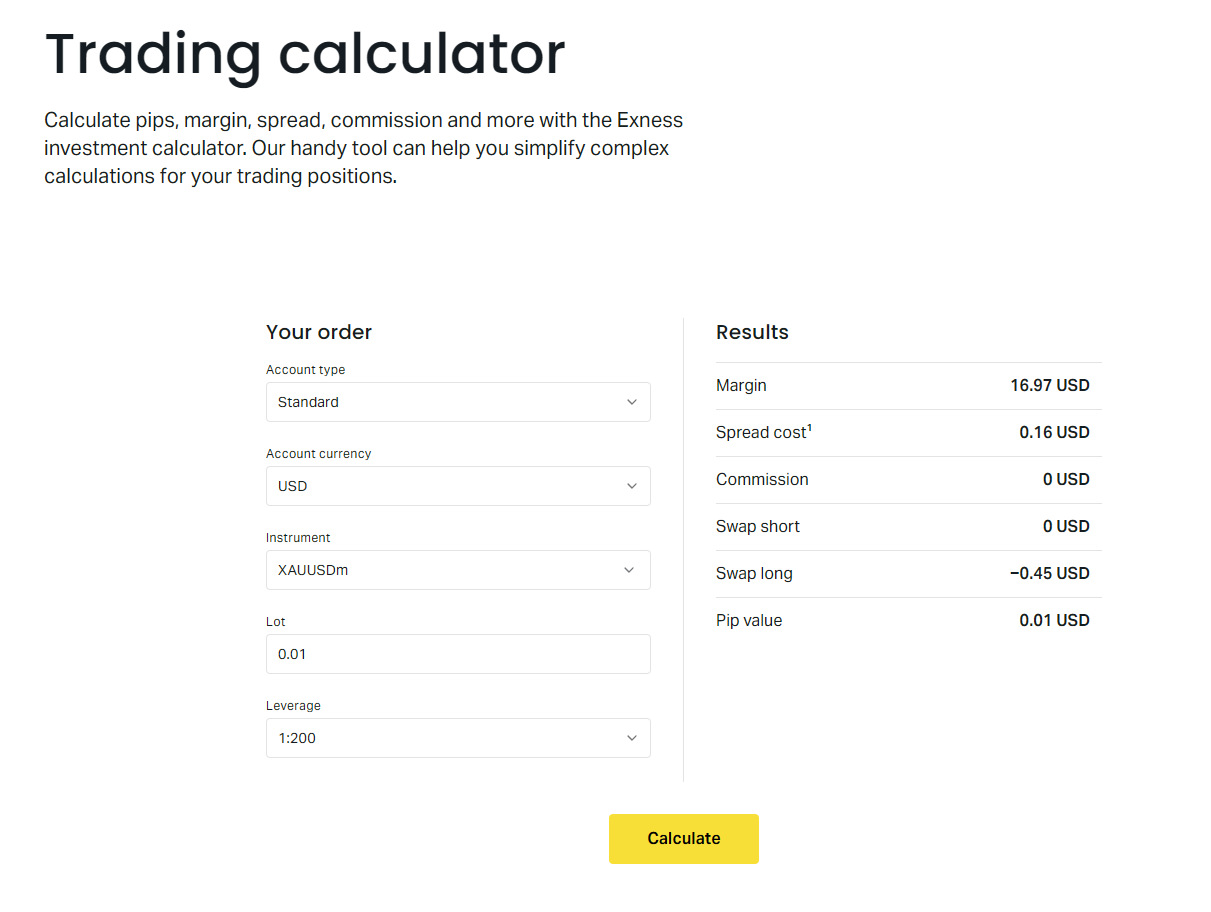
The calculator is useful for what-if scenarios. Before placing a trade, you can test different lot sizes to see how much margin each would consume. This helps you stay within your risk rules, such as never using more than 10% of equity as margin.
The calculator also shows swap charges for holding positions overnight. Swap can be positive or negative depending on the interest rate differential and the direction of your trade. For positions held weeks or months, swap becomes a meaningful cost or credit.
Common Margin Mistakes to Avoid
Traders often confuse leverage with margin rate. Setting leverage to 1:2000 does not give you 0.05% margin on EURUSD if the instrument rate is 0.5%. The platform will still require 0.5%. The leverage setting only limits maximum exposure relative to equity.
Another mistake is ignoring the margin impact of hedged positions. Exness uses a hedged margin system. If you hold a long and short position on the same symbol, the margin for the hedged portion is reduced but not eliminated. The exact reduction depends on the symbol and account type.
- Assuming high leverage equals low margin
- Forgetting that margin rates differ by symbol
- Not checking for pre-news margin increases
- Overloading correlated pairs (e.g., long EURUSD and long GBPUSD)
- Ignoring swap costs on long-term positions
- Letting free margin drop below 20% of equity
Correlated positions deserve special attention. Long EURUSD and long GBPUSD both expose you to USD weakness. If USD rallies, both positions lose simultaneously, doubling the margin pressure. Treat correlated exposure as a single risk unit when sizing positions.
The most dangerous margin mistake is believing you have more free margin than you actually do because of unrealized profits that can vanish in seconds.
Margin and Account Scaling
As your account grows, Exness applies dynamic leverage caps. This is not a penalty but a risk control. A $10,000 account at 1:2000 could control $20 million notional. A single 0.5% move would wipe the account. The leverage cap forces larger accounts to use more conservative position sizing.
The typical tiers are: equity up to $1,000 allows 1:2000; $1,000 to $5,000 allows 1:1000; $5,000 to $30,000 allows 1:500; above $30,000 allows 1:200. Professional accounts have higher tiers but follow the same principle. Check the current leverage rules page for exact thresholds.
If you withdraw funds and equity drops below a tier threshold, your maximum leverage increases automatically. Open positions are not affected, but new positions will use the higher leverage limit. This can create a situation where existing positions were opened under stricter limits than new ones.
Margin in the Exness Mobile App
The Exness mobile app displays margin level, free margin, and used margin on the main account screen. You can tap any open position to see its individual margin requirement. The app also includes a simplified margin calculator for quick checks before trading.
Push notifications alert you when margin level drops below 500%, 200%, and 100%. These thresholds are fixed and cannot be customized. On Professional accounts, you also receive a notification at 50% as a final warning before the 20% stop out.
The app shows margin impact in real time as you adjust lot size on the order screen. This is helpful for visualizing how a trade will affect free margin before confirming. The Web Terminal offers the same feature with a larger display.
Final Assessment of Exness Margin
Exness margin rules are competitive for active traders who understand the relationship between instrument rates, account tiers, and dynamic leverage. The 0% stop out on Standard accounts offers maximum staying power but zero buffer. Professional accounts trade earlier stop outs for lower margin rates and tighter spreads.
The calculator and real-time margin display make it straightforward to plan trades within your risk limits. The main risks come from pre-news margin increases, weekend gaps, and correlated exposure that concentrates margin pressure. Traders who monitor margin level daily and keep free margin above 20% of equity rarely face unexpected stop outs.
Frequently Asked Questions
What is the stop out level on Exness Standard accounts?
Standard accounts have a 0% stop out level. Positions are closed automatically when equity reaches zero.
Does changing leverage change the margin percentage?
No. Leverage caps maximum position size relative to equity. The margin percentage is fixed per instrument and account type.
How do I check the current margin rate for a symbol?
In MT4 or MT5, open Market Watch, right-click the symbol, and choose Specification. The margin rate appears as a percentage.
Can margin requirements increase without notice?
Exness usually announces increases 24-48 hours before major events. Check the Economic Calendar and platform notifications.
What happens to hedged positions margin?
Exness reduces margin for the hedged portion but does not eliminate it. The exact reduction varies by symbol and account type.
Does the mobile app show real-time margin level?
Yes. The main account screen displays margin level, free margin, and used margin. Push notifications trigger at 500%, 200%, 100%, and 50% (Pro accounts).
Are crypto margin rates lower on Professional accounts?
Crypto margin rates are typically 5-10% on both Standard and Professional accounts. They do not drop significantly on Pro tiers due to inherent volatility.