

Trading Tools & Calculators
Exness Margin Calculator: Complete Guide for Traders
Understand margin requirements, leverage impact, and position sizing with Exness trading tools.

Senior Forex Trader & Market Analyst
Daniel Chen is an experienced forex trader and financial market analyst with over 15 years of experience in currency trading. He specializes in technical analysis, risk management, and developing practical trading strategies to help traders make informed decisions.
The Exness margin calculator sits among the most practical tools a trader can use before placing a trade. It tells you exactly how much of your account balance will be locked up as collateral for a given position size, instrument, and leverage setting. That number matters because it determines whether you have enough free margin to withstand normal price fluctuations without triggering a margin call or stop out.
Contents
- 1. What Is the Exness Margin Calculator
- 2. How Margin Works in Forex and CFD Trading
- 3. Accessing the Calculator on Exness
- 4. Input Fields and What They Mean
- 5. Calculating Margin for Different Account Types
- 6. Leverage and Its Effect on Required Margin
- 7. Margin Calculation Examples Across Instruments
- 8. Margin Call and Stop Out Levels at Exness
- 9. Using the Calculator for Risk Management
- 10. Comparing Margin Requirements: Standard vs Professional Accounts
- 11. Common Mistakes When Calculating Margin
- 12. Dynamic Leverage and Large Position Adjustments
- 13. Swap Rates and Overnight Margin Impact
- 14. Integrating the Calculator into Your Pre-Trade Routine
- 15. Calculator Limitations and What It Does Not Show
- 16. Mobile Access and Offline Alternatives
- 17. Final Assessment of Exness Margin Calculator
Many traders open positions based on a hunch or a technical setup without checking the margin impact first. A quick calculation can reveal that a seemingly reasonable trade size would consume a dangerous percentage of available equity. The calculator removes that guesswork. It works for every instrument Exness offers — major and minor forex pairs, metals, energies, indices, stocks, and cryptocurrencies — and it respects the specific leverage rules that apply to each account type.
This guide walks through how the calculator works, what each input means, how leverage changes the numbers, and how to use the results for real risk management. It also covers the margin call and stop out levels Exness enforces, common mistakes traders make when estimating margin, and how the calculator fits into a broader pre-trade routine.
What Is the Exness Margin Calculator
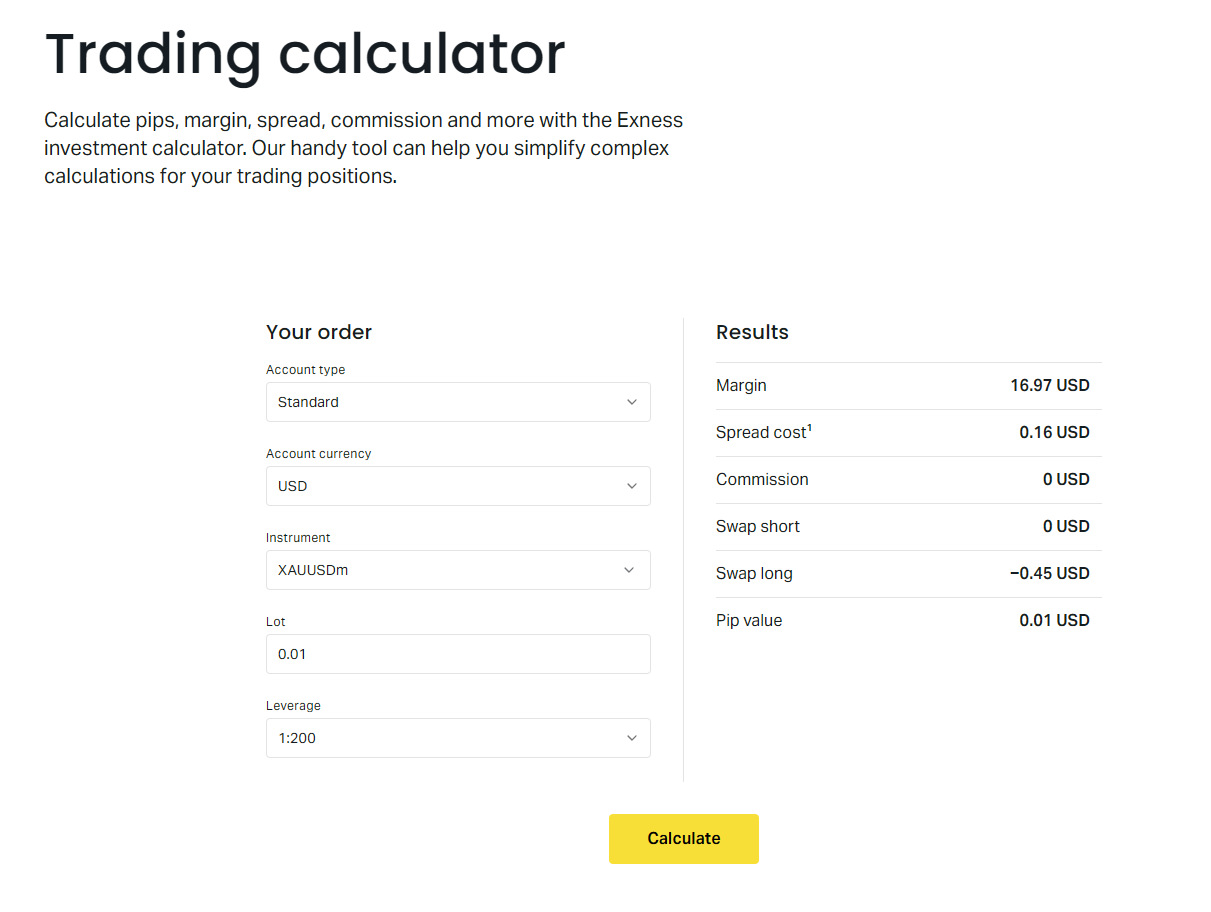
The Exness margin calculator is a free web-based tool that computes the required margin for any trade you plan to open. You select the account type, the trading instrument, the leverage, the position size in lots, and the account currency. The tool then returns the margin amount in your account currency. It also shows the pip value and the swap long and short rates for the selected instrument, which helps with holding-cost estimates.
Unlike some broker calculators that only handle forex pairs, the Exness version covers the full product range. That includes CFDs on indices like US30 and US500, commodities like gold and oil, individual stocks, and crypto pairs such as BTCUSD and ETHUSD. Each asset class has its own contract specifications — contract size, margin currency, leverage caps — and the calculator bakes those in automatically.
You can access the calculator directly from the Exness website under the Trading Tools section. No login is required, so you can test scenarios before you even open an account. The interface is straightforward: dropdowns for account type and instrument, numeric fields for leverage and volume, and a calculate button. Results appear instantly below the form.
How Margin Works in Forex and CFD Trading
Margin is not a fee or a cost. It is a good-faith deposit that the broker holds while your trade is open. When you open a leveraged position, you control a notional value much larger than the margin you put up. For example, with 1:100 leverage, a 1-lot EURUSD position (100,000 euros notional) requires only 1,000 euros in margin. The rest is effectively borrowed from the broker.
The margin stays locked until you close the position. If the market moves against you, your equity drops. Once equity falls to the margin call level, Exness will notify you. If it reaches the stop out level, the system starts closing positions automatically, beginning with the largest losing trade. Understanding where those levels sit relative to your used margin is essential for position sizing.
Accessing the Calculator on Exness
The calculator lives in the Trading Tools menu on the Exness homepage. You do not need to log in. The direct URL is typically something like exness.com/calculator or exness.com/trading-calculator. The page loads quickly on desktop and mobile. There is no separate app for the calculator; it runs in the browser.
If you are already logged into your Personal Area, you can also reach the calculator from the dashboard sidebar. The logged-in version may pre-select your default account type and currency, saving a couple of clicks. Either way, the calculation engine is identical.
Input Fields and What They Mean
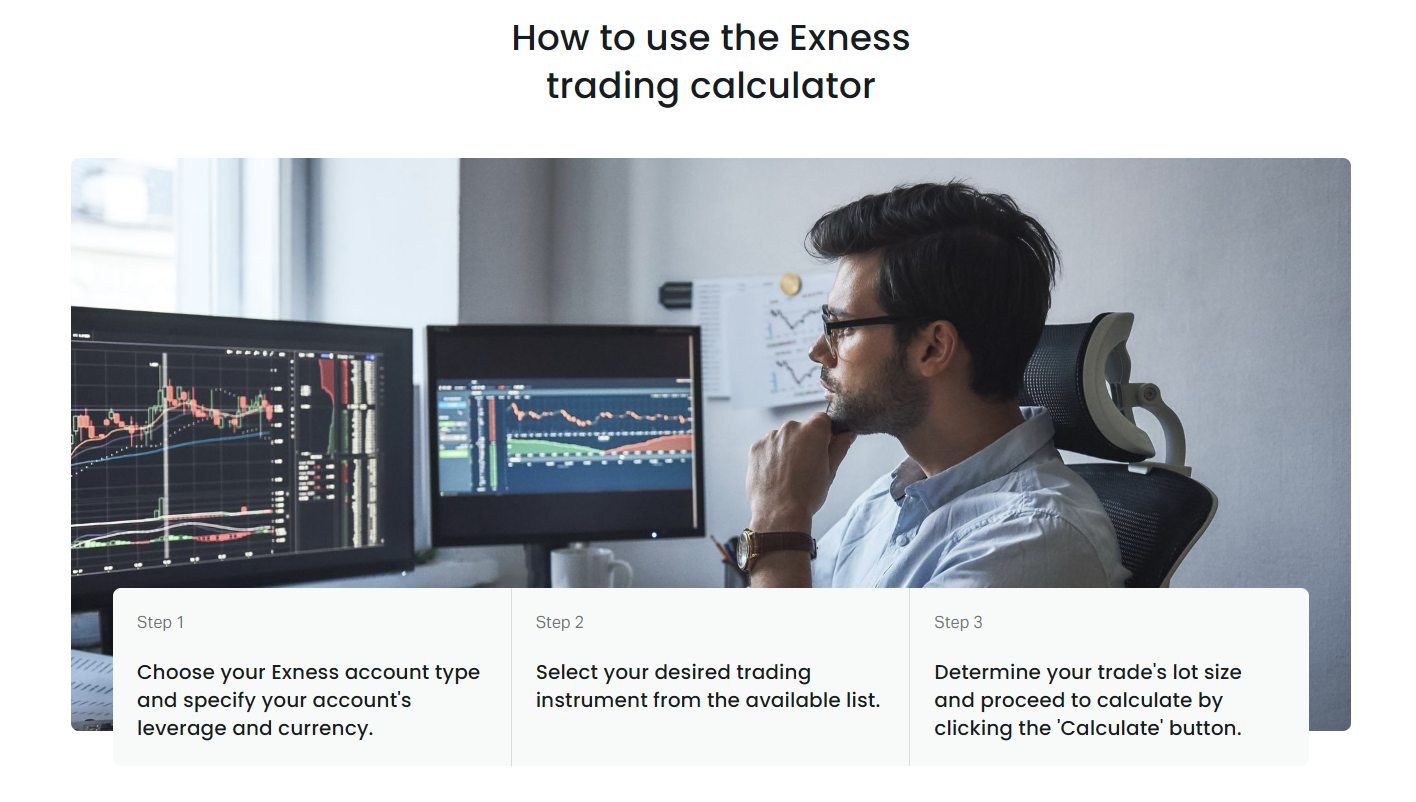
The calculator presents five main inputs. Each one affects the result, and getting them right matters more than the calculation itself.
- Account Type: Standard, Standard Cent, Pro, Raw Spread, Zero. Each has different leverage limits and commission structures.
- Instrument: The full list of tradable symbols. Forex pairs, metals, energies, indices, stocks, crypto. Select the exact symbol — EURUSD not EUR/USD.
- Leverage: The ratio you intend to use. The dropdown shows the maximum available for the chosen account type and instrument. You can select a lower value if you prefer.
- Volume: Position size in lots. One standard lot equals 100,000 units of the base currency for forex. For other instruments, check the contract size in the specification.
- Account Currency: The currency your account is denominated in. The margin result converts to this currency at the current rate.
After you hit Calculate, the output shows Required Margin, Pip Value, Swap Long, and Swap Short. Required Margin is the amount blocked from your free margin. Pip Value tells you how much each pip movement changes your profit or loss in account currency. Swap rates are the overnight financing costs or credits for holding the position past the server day rollover.
Calculating Margin for Different Account Types
Exness offers several account types, and the margin calculation respects the rules of each. Standard and Standard Cent accounts share the same leverage ceiling of 1:2000 for forex, but the cent account denominates everything in cents, so the numbers look 100 times larger. Pro, Raw Spread, and Zero accounts have a maximum leverage of 1:2000 as well, but they charge commissions per lot, which the margin calculator does not include — it only shows the collateral requirement.
Scroll horizontally to see all columns
| Account Type | Max Forex Leverage | Max Metals Leverage | Commission |
|---|---|---|---|
| Standard | 1:2000 | 1:2000 | None (spread only) |
| Standard Cent | 1:2000 | 1:2000 | None (spread only) |
| Pro | 1:2000 | 1:2000 | None (spread only) |
| Raw Spread | 1:2000 | 1:2000 | $3.5 per side per lot |
| Zero | 1:2000 | 1:2000 | $3.5 per side per lot |
The calculator does not ask you to pick a commission model. It only computes margin. If you trade on Raw Spread or Zero, remember to factor the commission into your total trade cost separately. The pip value shown assumes a standard lot; for cent accounts, the pip value will be in cents, not dollars.
Leverage and Its Effect on Required Margin
Leverage is the single biggest driver of the margin number. The relationship is inverse and linear: double the leverage, halve the margin. The calculator lets you test any leverage up to the maximum allowed for your account type and instrument. This is useful for seeing how much breathing room you gain or lose by adjusting leverage.
Exness applies dynamic leverage rules based on the total notional volume of your open positions. As your aggregate exposure grows, the maximum leverage available on new positions may step down. The calculator does not automatically apply these tiers — it uses the leverage you enter. For accurate planning on large accounts, check the dynamic leverage schedule in the contract specifications and test the lower tiers manually.
Leverage is a tool, not a strategy. The calculator shows the margin; your risk rules should decide the leverage.
Margin Calculation Examples Across Instruments
The formula behind the calculator is simple: Required Margin = (Contract Size × Volume × Current Price) / Leverage. For forex pairs where the account currency matches the quote currency, no conversion is needed. For cross pairs or non-forex instruments, the result converts at the current market rate. Below are concrete examples using typical prices and 1:100 leverage on a Standard USD account.
Scroll horizontally to see all columns
| Instrument | Contract Size | Volume (Lots) | Approx. Price | Required Margin (USD) |
|---|---|---|---|---|
| EURUSD | 100,000 | 1.0 | 1.0850 | 1,085 |
| GBPUSD | 100,000 | 0.5 | 1.2700 | 635 |
| XAUUSD (Gold) | 100 | 1.0 | 2,350 | 2,350 |
| USOIL (WTI) | 1,000 | 1.0 | 78.50 | 785 |
| US30 (Dow Jones) | 1 | 1.0 | 39,200 | 392 |
| BTCUSD | 1 | 0.1 | 67,000 | 67 |
Notice how gold requires more margin per lot than EURUSD because the contract size is 100 ounces and the price is high. The Dow Jones index has a contract size of 1 per point, so the notional value is the index level itself. Crypto contracts are often 1 coin per lot, so a 0.1-lot BTCUSD position at $67,000 needs only $67 margin at 1:100. These differences are why you must check each instrument individually rather than assuming a fixed margin per lot.
The calculator also handles the conversion when your account currency differs from the instrument's margin currency. For instance, if your account is in EUR and you trade USDJPY, the margin calculated in JPY converts to EUR at the current EURJPY rate. This conversion happens in real time, so the margin figure you see is what will actually be blocked from your EUR balance.
Margin Call and Stop Out Levels at Exness
Exness sets the margin call level at 60% and the stop out level at 0% for most account types. Margin call is a warning: when your equity drops to 60% of used margin, you receive a notification. Stop out means the system automatically closes positions once equity reaches zero. This is more generous than many brokers who stop out at 20% or 50%.
The practical implication is that you can let a trade draw down further before forced liquidation, but you also risk losing the entire account if you do not manage the position. The calculator helps you see the used margin upfront. From there, you can estimate how many pips of adverse movement would bring equity to the margin call threshold.
Using the Calculator for Risk Management
Risk management starts with deciding how much of your account you are willing to risk on a single trade. A common rule is 1% to 2% of equity per trade. The calculator does not enforce this rule, but it gives you the numbers to apply it. Once you know the required margin for a given lot size, you can compute the pip value and then determine the stop loss distance that matches your risk budget.
For example, if you have a $10,000 account and want to risk $100 (1%) on a EURUSD trade with a 20-pip stop loss, the pip value must be $5. At 1:100 leverage, a 0.5-lot position has a pip value of $5 and requires $542.50 margin. That leaves plenty of free margin. If you instead tried 2 lots, the margin would be $2,170 and the pip value $20 — a 20-pip stop would risk $400, breaking your 1% rule.
- Define max risk per trade (e.g., 1% of equity).
- Choose stop loss distance in pips based on analysis.
- Calculate required pip value: Risk Amount / Stop Loss Pips.
- Use calculator to find lot size that yields that pip value.
- Check required margin for that lot size.
- Ensure free margin after opening covers normal volatility.
Comparing Margin Requirements: Standard vs Professional Accounts
Standard and Standard Cent accounts use the same leverage limits, so the raw margin numbers are identical for the same volume. The difference appears in the cent account's denomination: a 1-lot EURUSD position shows 108,500 cents margin instead of 1,085 dollars. Pro, Raw Spread, and Zero accounts also share the same leverage ceiling. The margin calculator treats them the same because margin depends on leverage, not on spread or commission structure.
Where account type matters is in the total cost of trading. Raw Spread and Zero charge $3.5 per side per lot ($7 round turn). On a 1-lot EURUSD trade, that is $7 regardless of margin. Over many trades, the commission adds up. The calculator does not show this, so you must add it mentally or use a separate spreadsheet. For high-frequency strategies, the commission difference can outweigh the spread difference.
Scroll horizontally to see all columns
| Account Type | Typical Spread (pips) | Spread Cost | Commission | Total Cost per Round Turn |
|---|---|---|---|---|
| Standard | 1.0 | $10 | $0 | $10 |
| Pro | 0.6 | $6 | $0 | $6 |
| Raw Spread | 0.1 | $1 | $7 | $8 |
| Zero | 0.0 | $0 | $7 | $7 |
Common Mistakes When Calculating Margin
Traders often misuse the calculator or misinterpret its output. The most frequent error is confusing margin with risk. Margin is the collateral locked; risk is the potential loss determined by stop loss and position size. A trade can have low margin but high risk if the stop loss is wide or the position is large relative to equity.
- Assuming margin equals max loss — it does not.
- Forgetting that cent accounts show margin in cents, not dollars.
- Using the wrong contract size for indices or commodities.
- Ignoring dynamic leverage reductions on large positions.
- Not converting margin to account currency mentally when planning.
- Overlooking swap costs for positions held overnight.
- Treating the calculator as a position-sizing tool — it only shows margin.
The calculator tells you what the broker will hold. It does not tell you what you can afford to lose.
Dynamic Leverage and Large Position Adjustments
Exness applies dynamic leverage tiers based on the total notional value of all open positions on a given instrument group. For forex, the first $5 million notional may allow 1:2000, the next $5 million drops to 1:1000, and so on. The calculator does not automatically step down the leverage as you increase volume. If you enter 100 lots of EURUSD at 1:2000, it will show the margin at 1:2000 even though the actual leverage on that volume would be lower.
To plan accurately for large accounts, check the dynamic leverage table in the contract specifications. Then run the calculator multiple times: once at the top tier leverage for the first tranche, again at the next tier for the additional volume. Sum the margins. This is tedious but necessary if you trade size. Most retail traders never hit these tiers, but algorithmic and institutional users should build this into their pre-trade checks.
Swap Rates and Overnight Margin Impact
The calculator displays swap long and swap short values in account currency per lot per night. These are not margin, but they affect your equity daily. A negative swap reduces equity, which effectively increases your margin usage ratio. A positive swap adds equity, giving you more buffer. For positions held weeks or months, cumulative swaps can be significant.
Swap rates change periodically based on interest rate differentials and broker markup. The calculator shows the current rate. If you plan a swing trade, note the swap direction. For example, long EURUSD often has a negative swap (you pay), while short EURUSD may have a positive swap (you receive). This can tilt the risk-reward of a directional bias.
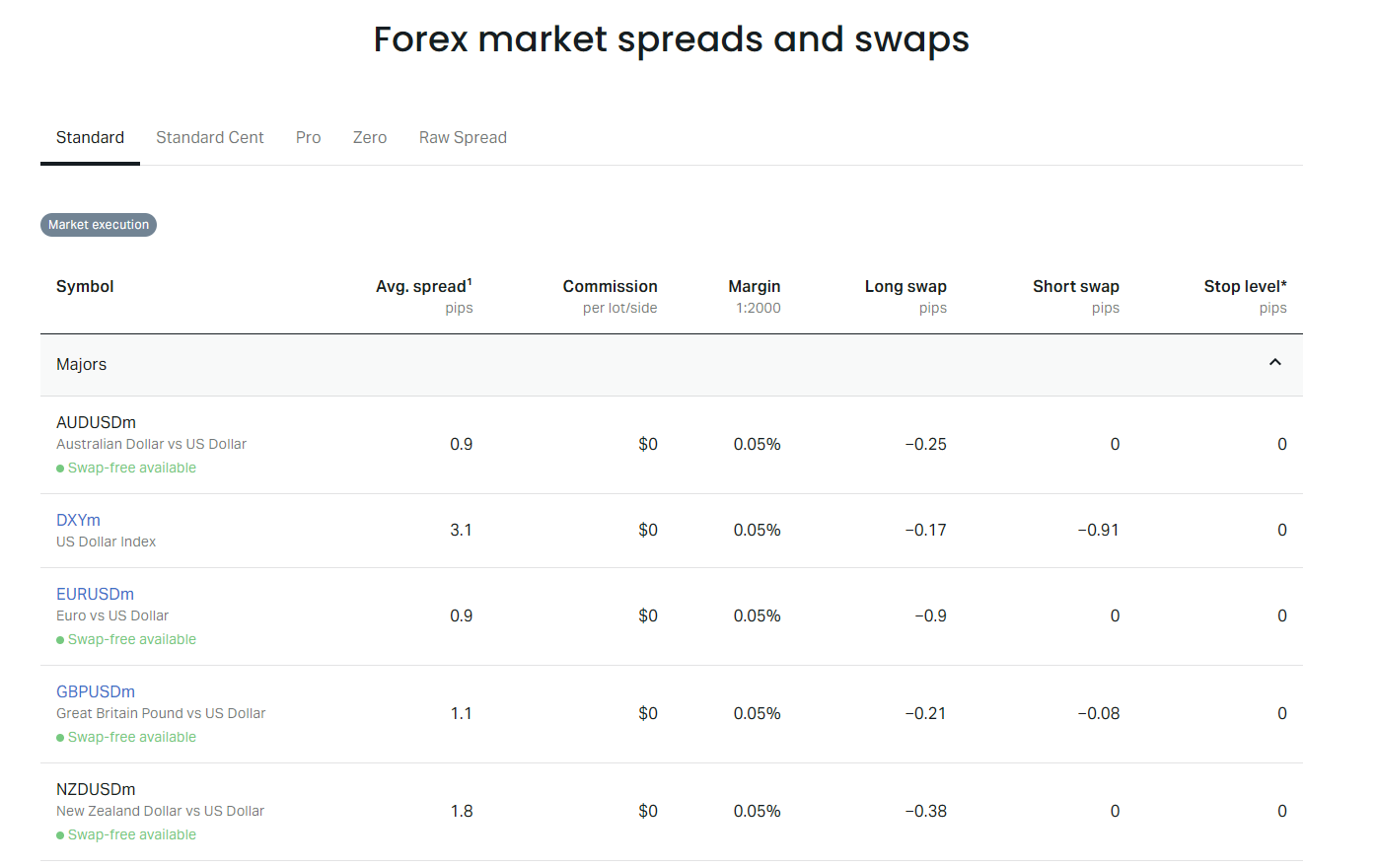
Islamic (swap-free) accounts do not charge or credit swaps on most instruments. Instead, they may have a fixed commission per lot after a certain holding period. The calculator does not have a swap-free toggle, so if you use an Islamic account, treat the swap fields as zero and check the specific commission schedule separately.
Integrating the Calculator into Your Pre-Trade Routine
A solid pre-trade routine uses the calculator as a checkpoint, not the whole process. Before you click buy or sell, run through these steps: confirm the instrument and account type, set the leverage you actually have available (accounting for dynamic tiers), enter the lot size your risk model dictates, verify the required margin leaves enough free margin for a 2–3% adverse move, check the pip value matches your stop loss risk calculation, and glance at the swap if you might hold overnight.
Do this in a browser tab alongside your charting platform. It takes 15 seconds. Skipping it is how traders accidentally open positions that margin call on a normal pullback. The calculator is fast, free, and accurate — there is no reason not to use it every time.
Calculator Limitations and What It Does Not Show
The Exness margin calculator is a single-purpose tool. It does not calculate profit targets, risk-reward ratios, position size from risk percentage, or compound growth. It does not factor in commissions, which are separate from margin. It does not simulate margin call scenarios at different price levels. It does not account for hedged margin reductions — Exness uses a 50% margin hedge policy for opposing positions on the same symbol, but the calculator treats each leg independently.
For hedged positions, the actual used margin is roughly half the sum of the two legs' margins. The calculator will show the full margin for each leg if you calculate them separately. You must know the hedge rule and do the math yourself. Similarly, the calculator does not reflect the margin relief from stop loss orders. Some brokers reduce required margin when a guaranteed stop is attached; Exness does not offer guaranteed stops, so this is not a factor.
A calculator is only as good as the inputs you give it. Garbage in, margin call out.
Mobile Access and Offline Alternatives
The web calculator works fine on mobile browsers. There is no standalone calculator app from Exness. If you need offline access, you can replicate the formula in a spreadsheet: Margin = (Contract Size × Lots × Price) / Leverage. Keep a sheet with contract sizes for your favorite instruments. Many traders also use the MetaTrader 4 or 5 terminal's built-in margin info — right-click a symbol in Market Watch, choose Specification, and the margin percentage is listed. The terminal also shows free margin and margin level in real time at the bottom of the Trade tab.
The terminal's margin level (Equity / Used Margin × 100%) is the live number to watch. When it approaches 60%, you are at margin call. When it hits 0%, stop out begins. The calculator gives you the static snapshot before the trade; the terminal gives you the dynamic reality during the trade. Use both.
Frequently Asked Questions
Does the Exness margin calculator include commissions in the required margin?
No. The calculator only shows the collateral margin required to open the position. Commissions on Raw Spread and Zero accounts are charged separately and do not affect the margin amount.
Can I use the calculator for hedged positions?
The calculator treats each position independently. For hedged positions on the same symbol, Exness applies a 50% margin reduction on the smaller leg. You must calculate this manually.
Why does the margin for my cent account show such a large number?
Cent accounts denominate everything in cents. A margin of 108,500 cents equals $1,085. The calculator is correct; just divide by 100 to get dollars.
Does the calculator automatically apply dynamic leverage tiers?
No. It uses the leverage you enter. For large volumes, check the dynamic leverage schedule and calculate each tier separately.
Are swap rates shown in the calculator guaranteed?
Swap rates are indicative and change daily based on interbank rates and broker markup. The calculator shows the current rate at the time of calculation.
Can I calculate margin for instruments not listed in the dropdown?
The dropdown includes all currently tradable instruments. If a symbol is missing, it may not be available for your account type or region.
Is the margin calculator available inside the Exness mobile app?
The Exness mobile app does not have a built-in margin calculator. Use the web version in your phone browser or the MetaTrader terminal's margin display.
Final Assessment of Exness Margin Calculator
The Exness margin calculator does exactly what it promises: it returns the required margin for any instrument, account type, leverage, and volume combination in seconds. It covers the full product range, handles currency conversion, and shows pip values and swaps. The interface is clean, requires no login, and works on mobile. For a free broker tool, it is complete and reliable.
Its limitations are the same as any single-purpose calculator. It does not size positions for you, does not model dynamic leverage tiers automatically, does not apply hedged margin rules, and does not include commissions. None of these are flaws — they are scope boundaries. The tool gives you the raw margin number. Turning that number into a position size that fits your risk plan is your job.
If you trade with Exness, keep the calculator bookmarked. Use it before every trade. Combine it with the live margin level in MetaTrader and a spreadsheet for dynamic leverage tiers if you trade size. That three-part system — pre-trade calculator, live terminal monitor, offline tier planner — covers the margin side of risk management completely. The calculator is the entry point. Do not skip it.