

Trading Tools
Exness Profit Calculator: How to Estimate Trade Outcomes
A practical guide to calculating potential profits and losses before you trade

Senior Forex Trader & Market Analyst
Daniel Chen is an experienced forex trader and financial market analyst with over 15 years of experience in currency trading. He specializes in technical analysis, risk management, and developing practical trading strategies to help traders make informed decisions.
The Exness profit calculator sits in the broker's suite of trading tools, designed to give traders a quick way to see what a position might return or cost before they commit real money. It handles forex pairs, metals, energies, indices, stocks, and cryptocurrencies, adjusting for the specific contract specifications of each instrument. The tool is accessible from the Exness website and inside the personal area, so you can use it whether you are logged in or just browsing.
Contents
- 1. Where to Find the Calculator
- 2. Input Fields and What They Mean
- 3. How the Calculation Works
- 4. Account Type Differences in the Calculator
- 5. Swap and Holding Cost Estimates
- 6. Using the Calculator for Position Sizing
- 7. Comparing Scenarios Side by Side
- 8. Limitations You Should Know
- 9. Integration with the Personal Area
- 10. Mobile Access and the Exness App
- 11. Practical Workflow for Daily Use
- 12. Currency Conversion Nuances
- 13. Margin and Leverage Interaction
- 14. When to Use Other Calculators Instead
- 15. Common Mistakes to Avoid
- 16. Advanced Use: Modeling Partial Exits
- 17. Final Assessment of Exness Profit Calculator
Most traders know the basic formula: profit equals price difference times volume times contract size. The calculator automates that math and adds the variables that often get forgotten — swap charges, commission, and the spread at the moment of calculation. It also converts the result into your account currency, which matters when you trade a pair like EURUSD while your account is denominated in USD or another currency.
This article walks through every input field, explains how the output numbers are derived, and shows where the calculator fits into a practical pre-trade routine. It also covers the limitations you should keep in mind so you do not treat the estimate as a guarantee.
Where to Find the Calculator
You can open the calculator from the main Exness website under the Trading Tools menu, or from the personal area after logging in. Both paths lead to the same interface. The public version works without an account, which is handy for quick checks. The personal area version remembers your default account currency and can pre-fill the leverage based on your account type, saving a few clicks if you run multiple calculations in a session.
Input Fields and What They Mean
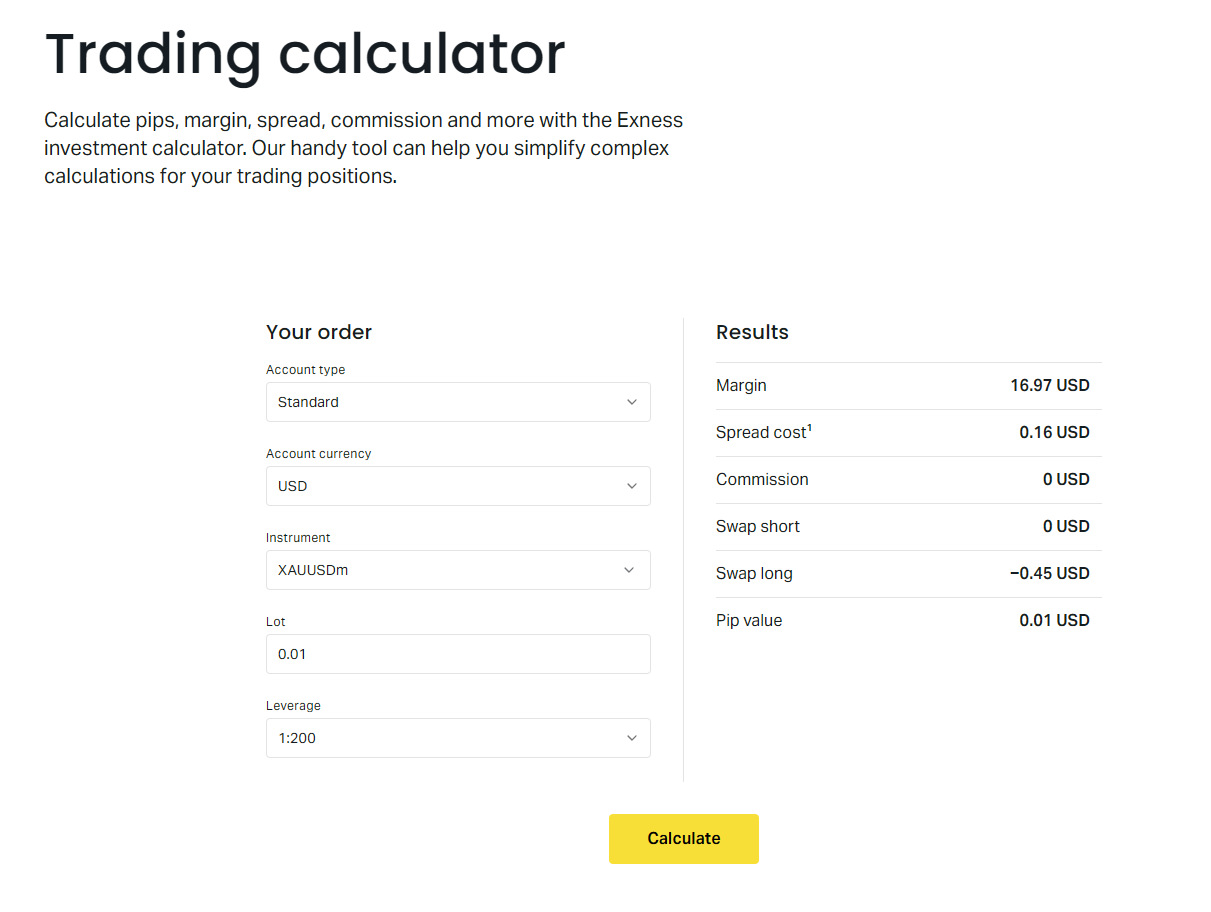
The calculator presents a single screen with a handful of dropdowns and number fields. Each one affects the final result, so it is worth understanding them individually.
- Account type — Standard, Standard Cent, Pro, Raw Spread, or Zero. This determines the spread and commission structure used in the calculation.
- Account currency — The currency your trading account is denominated in. The final profit or loss is converted to this currency at the current rate.
- Instrument — The full list of tradable symbols grouped by asset class. Selecting an instrument auto-fills the contract size and tick value.
- Lot size — Volume in lots. One standard lot equals 100,000 units of the base currency for forex. For other instruments, the contract size varies and is shown next to the field.
- Leverage — The leverage applied to the position. This does not change the profit amount but affects the margin required, which the calculator also displays.
- Open price — The price at which you plan to enter. You can type a specific level or use the current market price button.
- Close price — The price at which you plan to exit. For a long position, profit occurs when close price exceeds open price. For a short position, the opposite.
- Direction — Buy or Sell. This flips the profit formula automatically.
How the Calculation Works
Behind the scenes, the calculator follows a straightforward sequence. First, it computes the raw price difference in points: close price minus open price for buys, open price minus close price for sells. That difference is multiplied by the lot size and the contract size to get the gross profit in the instrument's quote currency. Then it subtracts the spread cost — the difference between bid and ask at the moment of calculation — multiplied by the lot size. If the account type charges commission, that fee is subtracted next. Finally, swap charges for holding the position overnight are estimated based on the current swap rates for the instrument and direction, multiplied by the number of days you specify.
The result is then converted to your account currency using the current cross rate. If your account is in USD and you trade EURUSD, no conversion is needed. If your account is in EUR and you trade GBPJPY, the calculator converts the JPY-denominated profit to EUR at the prevailing EURJPY rate. This conversion step is where many manual calculations go wrong, so having it automated is a real advantage.
The interface also shows the margin required for the position, calculated as contract size times lot size divided by leverage, then converted to account currency. This helps you verify that the trade fits within your available free margin before you open it.
Account Type Differences in the Calculator
Exness offers several account types, and the calculator adjusts its cost assumptions for each one. Standard and Standard Cent accounts use floating spreads with no commission. Pro accounts also use floating spreads but with tighter averages and no commission. Raw Spread accounts show the raw interbank spread plus a fixed commission per lot per side. Zero accounts offer zero spread on selected instruments for a higher commission. The calculator applies the correct spread and commission model automatically when you switch the account type dropdown.
Scroll horizontally to see all columns
| Account Type | Spread Model | Commission | Typical EURUSD Spread |
|---|---|---|---|
| Standard | Floating | None | ~1.0 pip |
| Standard Cent | Floating | None | ~1.0 pip |
| Pro | Floating | None | ~0.6 pip |
| Raw Spread | Raw + Markup | $3.5 per lot per side | ~0.0 pip + commission |
| Zero | Zero on majors | $3.5–$5 per lot per side | 0.0 pip on majors |
The spread values in the table are indicative averages. The calculator uses the live spread at the moment you press calculate, so the actual cost may differ slightly from these typical figures.
Swap and Holding Cost Estimates
Swap charges — also called rollover fees — apply when a position is held past the daily cutoff time, usually 22:00 UTC. The calculator includes a field for the number of days you expect to hold the trade. It multiplies the daily swap rate for the selected instrument and direction by the lot size and the number of days. Swap rates can be positive or negative depending on the interest rate differential between the two currencies or the financing cost for non-forex instruments.
For forex pairs, the swap is derived from the tom-next rate plus the broker's markup. For metals, energies, indices, and stocks, the swap reflects the cost of financing the notional value. Cryptocurrency swaps are typically higher due to volatility and funding market structure. The calculator pulls the current swap rates from the Exness specification sheet, so the estimate reflects today's conditions. Keep in mind that swap rates change daily, especially around central bank decisions or holiday rollovers where triple swap applies.
Using the Calculator for Position Sizing
One of the most practical uses is reverse-engineering the lot size to match a specific risk amount. Suppose you want to risk $100 on a EURUSD trade with a 20-pip stop loss. You can set the open price, set the close price 20 pips away in the loss direction, and then adjust the lot size until the calculated loss equals $100. The calculator updates the profit or loss field in real time as you change the lot size, making this trial-and-error process fast.
This approach is more reliable than using a fixed lot size because it accounts for the actual pip value in your account currency, the current spread, and any commission. It also shows the margin required for that lot size at your chosen leverage, so you can confirm the position fits your account balance.
- Set your account type and currency first — they affect pip value and conversion.
- Enter the instrument and direction.
- Input your planned entry price and stop-loss price as the close price.
- Adjust lot size until the loss matches your risk tolerance.
- Check the margin required field to ensure sufficient free margin.
- Note the swap cost if you plan to hold overnight.
Comparing Scenarios Side by Side
The calculator does not have a built-in comparison mode, but you can open multiple browser tabs or windows to run different scenarios simultaneously. This is useful when deciding between two instruments, two account types, or two leverage settings. For example, you might compare a EURUSD trade on a Standard account versus a Raw Spread account to see whether the commission savings outweigh the tighter spread for your typical trade size and holding period.
Scroll horizontally to see all columns
| Parameter | Standard Account | Raw Spread Account |
|---|---|---|
| Instrument | EURUSD | EURUSD |
| Lot Size | 1.0 | 1.0 |
| Spread Cost (est.) | $10 | $0 |
| Commission | $0 | $7 |
| Total Cost per Round Turn | $10 | $7 |
| Margin Required (1:1000) | $100 | $100 |
In this simplified example, the Raw Spread account costs less per round turn despite the commission, because the spread saving exceeds the commission. For smaller lot sizes, the fixed commission may make Standard cheaper. The calculator lets you test your exact parameters.
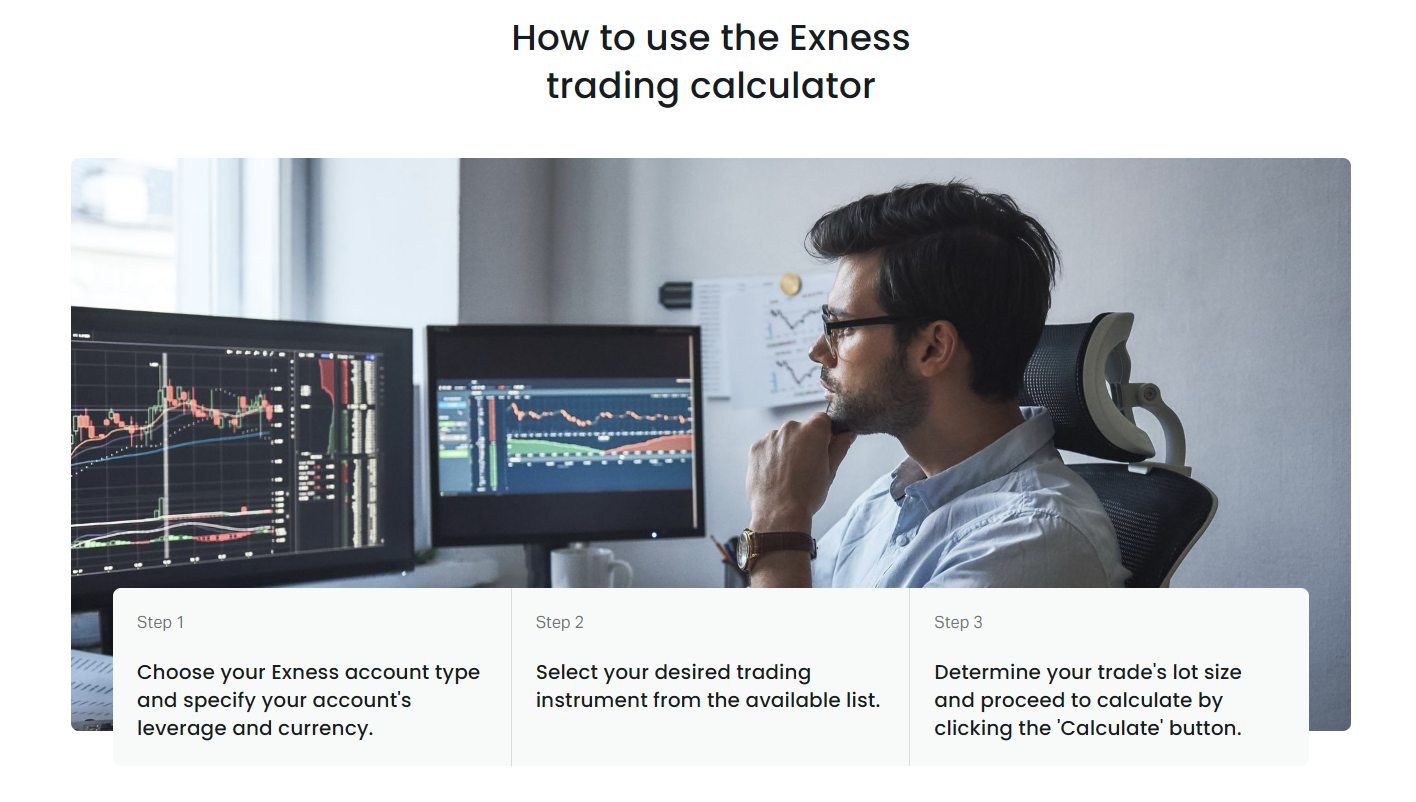
The guide view, accessible via a help icon, breaks down every component: gross profit, spread cost, commission, swap, and net result. It also shows the conversion rate used if the instrument quote currency differs from your account currency. This transparency helps you audit the numbers and understand where costs come from.
Limitations You Should Know
The calculator is an estimation tool, not a trade execution simulator. Several factors can cause the actual result to differ from the calculated estimate.
- Spread at execution may differ from the spread at calculation time, especially during news events or low liquidity periods.
- Slippage can shift the fill price away from your requested price, changing the effective entry or exit level.
- Swap rates update daily. A multi-day hold will incur different swap charges each night.
- Commission tiers may apply for high-volume traders on Raw Spread and Zero accounts, reducing the per-lot cost below the standard rate shown.
- Currency conversion uses the current cross rate. If your account currency is not the quote currency, the conversion rate at trade close will differ from the rate at calculation time.
- The calculator assumes a single position. It does not net multiple positions in the same instrument or account for hedging margin reductions.
Integration with the Personal Area
When you open the calculator from inside the personal area, it reads your default account settings. The account type, currency, and leverage are pre-selected based on the account you are currently viewing. You can still override any field, but the defaults save time if you mostly trade on one account. The personal area version also shows your current free margin and equity at the top of the page, so you can immediately see whether the calculated margin requirement fits.
There is no direct button to send the calculated parameters to the order ticket. You still need to open the trading platform — MT4, MT5, Web Terminal, or the mobile app — and enter the trade manually. This separation is intentional; the calculator is for planning, not execution.
Mobile Access and the Exness App
The Exness mobile app includes a simplified calculator under the Tools section. It covers the same core inputs — instrument, lot size, open and close price, direction — but omits some advanced fields like swap days and commission tier selection. The app version uses the same live spread and swap data as the web version, so the estimates are consistent. It is convenient for quick checks when you are away from a desktop, but for detailed scenario planning, the full web version is more complete.
A calculator that matches your broker's exact cost structure beats a generic one every time. The Exness tool uses live spreads and real swap rates, not static assumptions.
Practical Workflow for Daily Use
Many traders incorporate the calculator into their morning routine. After reviewing the economic calendar and identifying potential setups, they run the numbers for each candidate trade. The workflow typically looks like this:
- Pull up the calculator in a pinned browser tab.
- Set account type and currency once at the start of the session.
- For each setup, select the instrument and direction.
- Enter the planned entry price based on your analysis.
- Enter the stop-loss price as the close price to see the risk amount.
- Adjust lot size to match your risk per trade rule.
- Check the margin required and confirm it fits your free margin.
- If holding overnight, add the expected days and review the swap cost.
- Record the risk, reward, and risk-reward ratio in your trading journal.
- Execute the trade in the platform if the setup still looks valid.
This routine takes a minute or two per trade and prevents the common mistake of entering a position without knowing the exact dollar risk or margin impact.
Currency Conversion Nuances
When your account currency differs from the instrument's quote currency, the calculator performs a conversion at the current market cross rate. For example, a USD-denominated account trading EURGBP: the profit is calculated in GBP, then converted to USD at the current GBPUSD rate. The conversion rate used is displayed in the detailed breakdown. This matters because the conversion rate at the time you close the trade will almost certainly differ from the rate at calculation time, introducing an additional variable.
If you trade cross pairs frequently, consider keeping a sub-account in the quote currency of your most traded crosses, or at least be aware that the final profit in your account currency carries conversion risk. The calculator does not model this risk; it only shows the conversion at the moment of calculation.
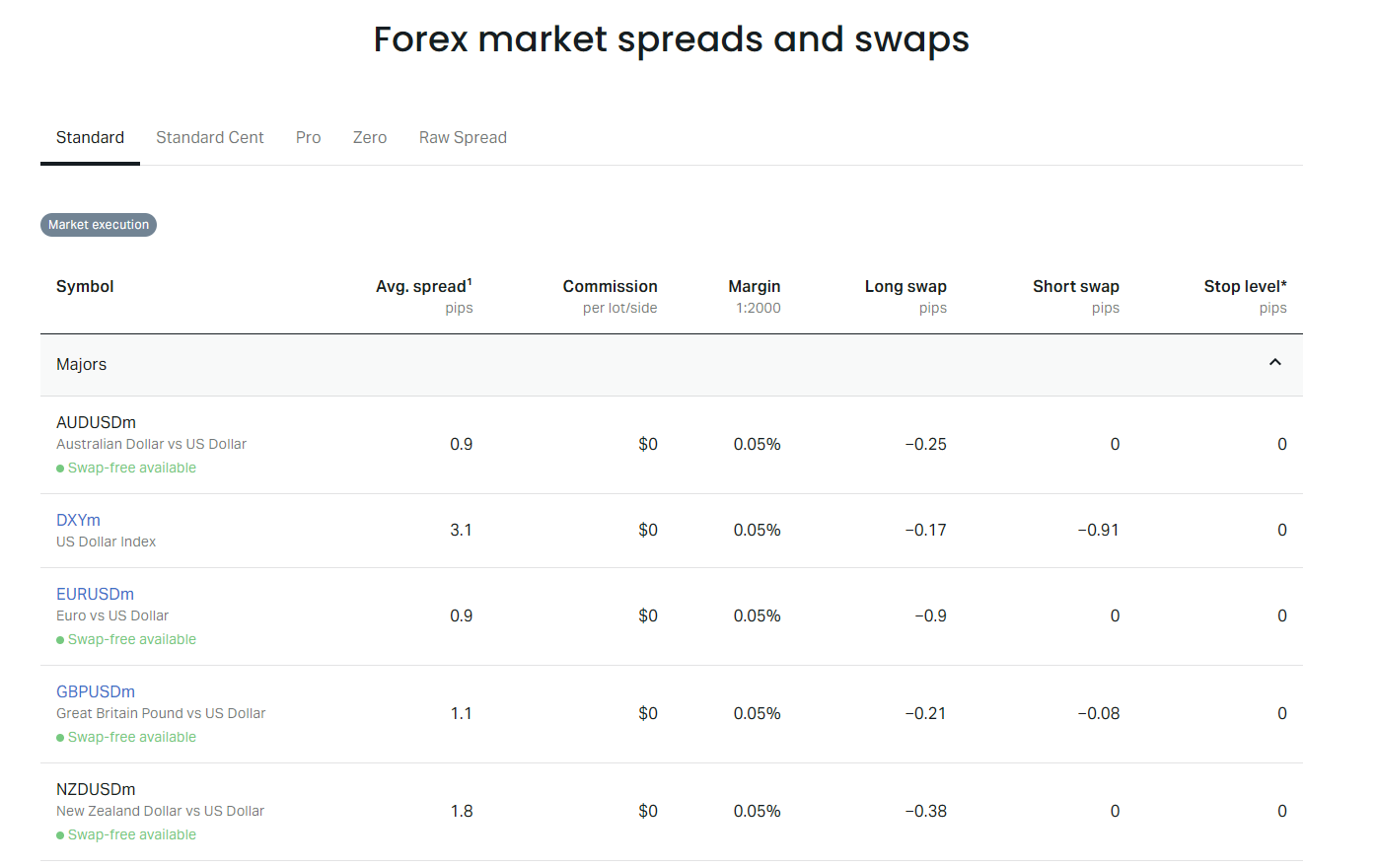
The spreads and swaps page in the Exness website provides the raw data that powers the calculator. You can view the average spread, minimum spread, and current swap long and short for every instrument. This reference is useful when you want to verify the numbers the calculator uses or when you are comparing instruments before adding them to your watchlist.
Margin and Leverage Interaction
The calculator shows the margin required for the position based on the leverage you select. Exness offers dynamic leverage that decreases as your account equity grows, but the calculator lets you input any leverage value up to the maximum for your account type. This is useful for planning: you can see how much margin a position would consume at 1:2000 versus 1:500, helping you decide whether to reduce leverage to preserve free margin for other trades.
When to Use Other Calculators Instead
The profit calculator is general-purpose. For specific tasks, Exness provides dedicated tools that may be more convenient:
- Pip calculator — converts a pip movement into account currency value for a given lot size. Faster for quick pip-value checks.
- Margin calculator — computes required margin for a position without the profit/loss fields. Useful when you only need to know margin impact.
- Currency converter — converts an amount from one currency to another at current rates. Helpful for withdrawal planning or multi-currency accounts.
- Swap calculator — shows the daily swap charge for a specific instrument and lot size without the full trade setup.
All these tools share the same live data feed, so they are consistent with each other. The profit calculator is the most comprehensive because it combines all cost elements into a single net result.
The dedicated calculators exist because traders asked for faster answers to specific questions. Use the right tool for the question you have right now.
Common Mistakes to Avoid
Even a simple tool can be misused. Here are the mistakes that show up most often in practice:
- Forgetting to set the account type, so the spread and commission assumptions default to Standard when you actually trade on Raw Spread.
- Using the current market price for both open and close, which yields zero profit and hides the spread cost.
- Ignoring swap for multi-day trades, then being surprised by the overnight charges.
- Assuming the calculated profit is guaranteed. Execution spread, slippage, and conversion rate changes all affect the real outcome.
- Not checking the margin required against free margin, leading to margin calls when other positions move against you.
- Using the calculator for position sizing but entering a different lot size in the platform due to a typo or last-minute change.
Advanced Use: Modeling Partial Exits
The calculator handles one entry and one exit. To model a partial exit — closing half the position at a target and letting the rest run — run the calculator twice. First, calculate the profit for the full lot size at the first target. Then, calculate the profit for the remaining lot size at the second target. Add the two results. This manual approach works because the cost structure is linear with respect to lot size: spread, commission, and swap all scale proportionally.
For scaling in — adding to a winning position — calculate each entry as a separate trade with its own entry price and the same exit price. Sum the results. The margin required will be the sum of the individual margins at the time of each entry, assuming leverage stays constant.
Final Assessment of Exness Profit Calculator
The Exness profit calculator does what it promises: it turns the broker's actual trading conditions — live spreads, real commission schedules, current swap rates, and accurate contract specifications — into a single net profit or loss estimate in your account currency. It is not a crystal ball. It cannot predict slippage, future spread widening, or swap rate changes. But it eliminates the arithmetic errors and omitted costs that plague manual calculations. For any trader using Exness, spending thirty seconds in this tool before placing a trade is a low-effort habit that prevents expensive surprises. The integration with the personal area, the live data feed, and the transparent breakdown make it more reliable than generic third-party calculators that rely on static assumptions. Use it for risk sizing, for comparing account types, for checking margin impact, and for understanding the true cost of holding a position overnight. Just remember that the output is an estimate based on current conditions, not a contract.
Frequently Asked Questions
Does the calculator use real-time spreads or fixed averages?
It uses the live spread at the moment you press calculate. The spread updates continuously during market hours.
Can I save my calculation results for later reference?
There is no save or export function. You can screenshot the result or copy the numbers into your trading journal manually.
Why does the profit differ when I switch account types?
Each account type has a different spread and commission structure. Raw Spread and Zero accounts add commission but offer tighter spreads, which changes the net result.
Does the calculator account for dynamic leverage reductions?
No. You can input any leverage value up to the maximum for the account type. Check your personal area for the actual leverage available at your current equity level.
Is the swap estimate guaranteed for the holding period I enter?
Swap rates change daily. The calculator uses the current day's rate multiplied by the number of days. Actual swap charges will vary each night.
Can I use the calculator for instruments not listed in the dropdown?
The dropdown includes all instruments currently offered by Exness. If an instrument is missing, it may not be available for your account type or region.
Does the calculator work on the Exness mobile app?
Yes, a simplified version is available in the app under Tools. It uses the same live data but has fewer input fields.