

Forex Trading Education
Exness Margin Call: How It Works and What Traders Need to Know
A practical guide to margin calls, stop out levels, and risk management on Exness trading accounts.

Senior Forex Trader & Market Analyst
Daniel Chen is an experienced forex trader and financial market analyst with over 15 years of experience in currency trading. He specializes in technical analysis, risk management, and developing practical trading strategies to help traders make informed decisions.
Margin calls are one of the most misunderstood aspects of leveraged trading. Many traders learn about them only after receiving a notification that their positions are at risk. On Exness, the margin call and stop out system follows specific rules that differ from some other brokers. Understanding these mechanics before you trade can prevent unexpected liquidations and help you plan position sizes more accurately.
Contents
- 1. What Is a Margin Call on Exness
- 2. Exness Margin Call and Stop Out Levels by Account Type
- 3. How Margin Requirements Work Across Instruments
- 4. Calculating Margin for Different Instruments
- 5. What Triggers a Margin Call in Practice
- 6. Using the Exness Margin Calculator
- 7. Margin Call vs Stop Out: Key Differences
- 8. Managing Positions When Margin Drops
- 9. Leverage Changes and Margin Impact
- 10. Practical Steps to Avoid Margin Calls
- 11. Negative Balance Protection and Margin Calls
- 12. Margin Call Behavior on Different Platforms
- 13. Final Assessment of Exness Margin Call Rules
This article explains how Exness defines margin calls, where the stop out levels sit for each account type, how margin requirements change across instruments, and what practical steps you can take to avoid reaching those thresholds. The information applies to both MetaTrader 4 and MetaTrader 5 platforms offered by Exness, as well as the Exness Web Terminal and mobile apps.
We will also cover the Exness trading calculator, which lets you estimate required margin before opening a trade, and discuss how leverage adjustments during high volatility or weekend hours can affect your margin buffer. By the end, you should have a clear picture of where your account stands relative to a margin call at any given moment.
What Is a Margin Call on Exness
A margin call on Exness is a warning that your account equity has fallen to a level where it can no longer comfortably support your open positions. It does not automatically close trades. Instead, it signals that you should either deposit additional funds, reduce position sizes, or close losing trades to restore a healthier margin level. The margin call threshold is expressed as a percentage of equity relative to used margin.
Exness sets the margin call level at 100% for most account types. This means when your equity equals your used margin — in other words, when your free margin reaches zero — you receive a margin call notification. At this point you cannot open new positions, but existing positions remain open. The platform will highlight the margin level in red, and you may receive an email or push notification depending on your alert settings.
It is important to distinguish between a margin call and a stop out. A margin call is a warning. A stop out is the forced closure of positions by the system to prevent your account from going into negative balance. Exness uses a stop out level of 0% for most accounts, meaning positions are closed only when equity falls to zero or below. This is more generous than many brokers who stop out at 20%, 30%, or 50% margin levels.
Exness Margin Call and Stop Out Levels by Account Type
Exness offers several account types, and while the core margin call and stop out logic remains consistent, there are nuances worth knowing. The Standard and Standard Cent accounts share the same 100% margin call and 0% stop out levels. Professional accounts — Raw Spread, Zero, and Pro — also use these same thresholds. The main difference lies in the margin requirements themselves, which vary by instrument and leverage tier.
Islamic (swap-free) accounts follow identical margin call and stop out rules. The only structural difference is the absence of overnight swap charges, which can slightly improve equity retention over longer holding periods. Demo accounts mirror live account margin behavior exactly, making them useful for testing margin scenarios without financial risk.
Scroll horizontally to see all columns
| Account Type | Margin Call Level | Stop Out Level | Notes |
|---|---|---|---|
| Standard | 100% | 0% | Default for retail clients |
| Standard Cent | 100% | 0% | Cent-denominated balances |
| Raw Spread | 100% | 0% | Commission-based pricing |
| Zero | 100% | 0% | Fixed zero spread on majors |
| Pro | 100% | 0% | Market execution, no commissions |
| Islamic (Swap-Free) | 100% | 0% | No overnight swaps |
The 0% stop out level means Exness allows your equity to drop all the way to zero before liquidating. In practice, the system closes positions one by one, starting with the largest losing position, once equity hits zero. This gives you more room to manage a drawdown compared to brokers with higher stop out levels, but it also means you can lose your entire account balance if the market moves sharply against you.
How Margin Requirements Work Across Instruments
Margin requirement is the amount of equity you must have to open and maintain a position. It is calculated as a percentage of the notional value of the trade and varies by instrument, account leverage, and sometimes by time of day. Exness publishes margin requirements for each symbol in the contract specifications within MetaTrader and on the Exness website.
For major forex pairs like EURUSD, the base margin requirement at 1:2000 leverage is 0.05% of notional value. At 1:100 leverage, it rises to 1%. Gold (XAUUSD) typically requires 0.5% at 1:2000 leverage, while major indices like US30 may require 1% or more. Cryptocurrencies often carry higher margin requirements — 5% to 10% or more — due to their volatility. These percentages determine how much of your equity becomes used margin when you open a trade.
- Major forex pairs: 0.05% to 1% depending on leverage tier
- Gold (XAUUSD): typically 0.5% at highest leverage
- Major indices (US30, US500, USTEC): 1% to 3%
- Cryptocurrencies (BTCUSD, ETHUSD): 5% to 10%+
- Energies (UKOIL, USOIL): 1% to 3%
- Stocks and ETFs: 5% to 20% depending on liquidity
Exness also applies dynamic leverage rules. As your total open position volume increases, the maximum available leverage decreases in steps. For example, the first $50,000 notional value might allow 1:2000, the next $200,000 might drop to 1:1000, and so on. This means a large position can consume more margin than a simple calculation at maximum leverage would suggest. Always check the leverage tier table for your account type.
Calculating Margin for Different Instruments
The basic margin formula is: Required Margin = (Contract Size × Lot Size × Market Price) / Leverage. For a standard lot of EURUSD at 1.0850 with 1:500 leverage, the calculation is (100,000 × 1 × 1.0850) / 500 = $217. For a micro lot (0.01), it would be $2.17. Exness uses contract sizes of 100,000 units for standard forex lots, 100 ounces for gold, and varying contract sizes for indices and commodities.
Let's walk through a gold example. One standard lot of XAUUSD is 100 ounces. At a price of $2,350 and 1:200 leverage, required margin = (100 × 1 × 2,350) / 200 = $1,175. If you open 0.5 lots, margin required is $587.50. For US30 (Dow Jones), one lot might represent $5 per point. At 35,000 points with 1:100 leverage, margin = (5 × 1 × 35,000) / 100 = $1,750 per lot.
Scroll horizontally to see all columns
| Instrument | Lot Size | Price | Leverage | Required Margin |
|---|---|---|---|---|
| EURUSD | 1.00 | 1.0850 | 1:500 | $217.00 |
| EURUSD | 0.10 | 1.0850 | 1:500 | $21.70 |
| XAUUSD | 1.00 | 2,350 | 1:200 | $1,175.00 |
| XAUUSD | 0.10 | 2,350 | 1:200 | $117.50 |
| US30 | 1.00 | 35,000 | 1:100 | $1,750.00 |
| BTCUSD | 1.00 | 65,000 | 1:50 | $1,300.00 |
These calculations assume the maximum leverage available for that instrument and volume tier. If your total open volume pushes you into a lower leverage tier, the required margin will be higher. The Exness trading calculator handles this automatically, which is why it is the most reliable way to check margin before trading.
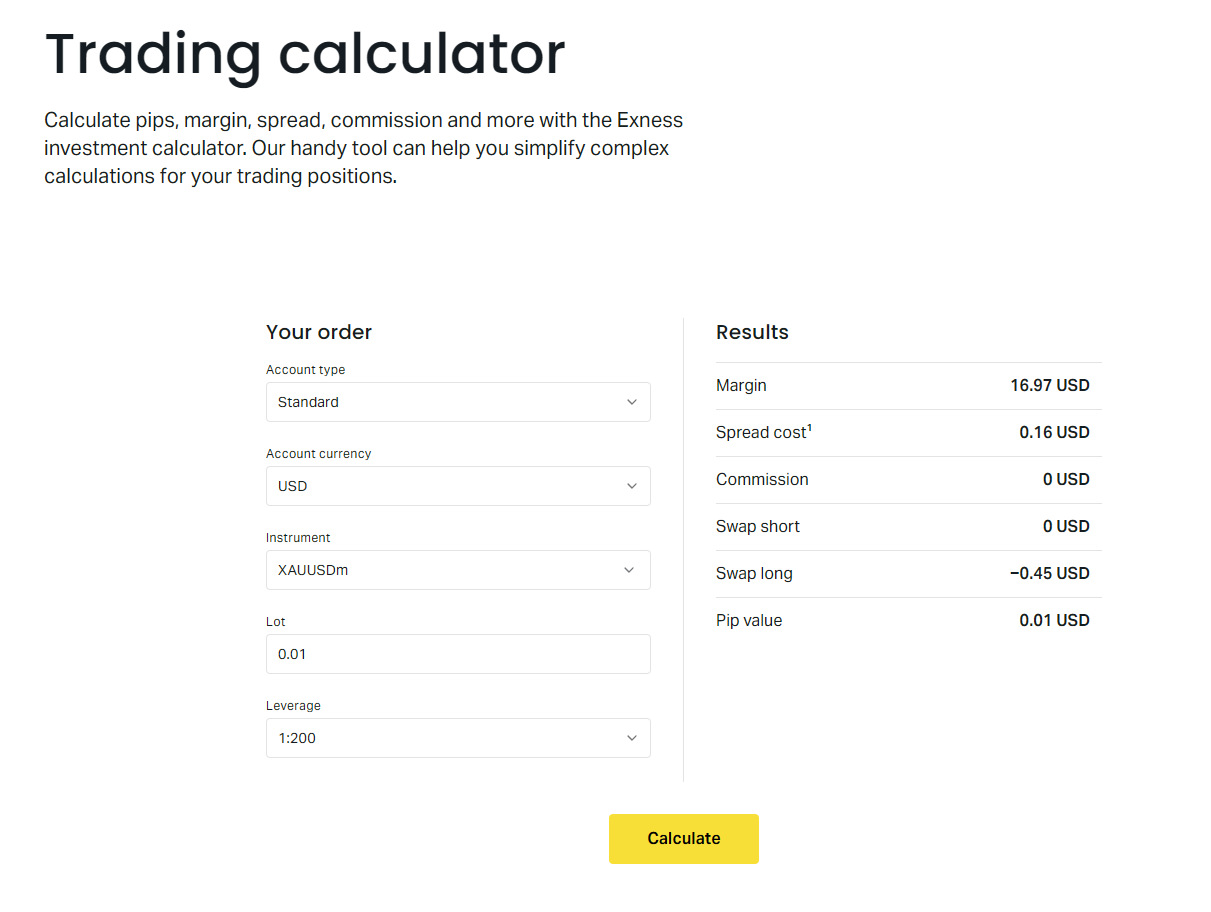
The calculator is accessible from the Exness personal area and within the web terminal. You select the account type, instrument, lot size, and leverage, and it returns the required margin, pip value, and estimated swap charges for long and short positions. This tool is especially useful when planning trades around news events where margin requirements may temporarily increase.
What Triggers a Margin Call in Practice
A margin call triggers when your account equity falls to 100% of used margin. Equity is your balance plus or minus floating profit and loss on open positions. Used margin is the sum of required margin for all open positions. As floating losses grow, equity drops while used margin stays constant (unless positions are closed or leverage tiers change). When equity equals used margin, free margin hits zero and the margin call activates.
Common scenarios that lead to margin calls include holding losing positions through adverse market moves, overleveraging relative to account size, and failing to account for swap charges on positions held overnight. Weekend gaps can also trigger margin calls if the market opens significantly against your positions, because equity updates at market open while used margin remains unchanged.
- Large floating losses on highly leveraged positions
- Accumulated negative swaps on long-term shorts
- Weekend or holiday market gaps against open trades
- Sudden volatility spikes widening spreads and increasing margin
- Adding to losing positions without reducing size elsewhere
- Leverage tier reduction as total volume increases
Exness may also increase margin requirements temporarily ahead of major economic events — central bank rate decisions, non-farm payrolls, elections — or during periods of extreme volatility. These changes are announced in the personal area and via email. When margin requirements rise, used margin increases instantly, which can push your margin level down and trigger a margin call even if prices have not moved.
Using the Exness Margin Calculator
The Exness margin calculator is the most practical tool for avoiding margin surprises. It accounts for your specific account type, current leverage tiers, instrument specifications, and any temporary margin requirement changes. You can access it from the personal area under Trading Tools or directly in the web terminal. The mobile app also includes a simplified version.
To use it, select your account type (Standard, Raw Spread, Zero, Pro), choose the trading instrument, enter the planned lot size, and set the leverage. The calculator displays required margin, pip value per lot, and swap rates for long and short positions. It also shows the margin level percentage based on your current equity if you are logged in. This lets you see exactly how a new trade would affect your margin buffer.
- Select account type to apply correct leverage tiers
- Choose instrument for accurate contract specifications
- Enter lot size to see exact margin requirement
- View pip value for profit/loss estimation
- Check swap rates for overnight holding costs
- See projected margin level after opening trade
A useful habit is to run the calculator before every trade, especially when increasing position size or trading a new instrument. It takes ten seconds and can prevent a margin call that would force you to make rushed decisions under pressure. The calculator also helps you compare margin efficiency across instruments — for example, you might find that trading a smaller lot of a higher-leverage pair gives you similar exposure with less margin used.
The trading protection page illustrates how Exness displays margin levels in real time. The margin level percentage updates with every tick. When it approaches 100%, the indicator turns yellow, then red at the margin call threshold. This visual feedback helps you monitor risk without constantly calculating manually.
Margin Call vs Stop Out: Key Differences
The distinction between margin call and stop out is critical because they require different responses. At margin call (100% margin level), you still have control. You can deposit funds, close positions manually, or hedge with opposite positions (if hedging is allowed on your account). No positions are closed automatically. At stop out (0% margin level), the system takes over and closes positions starting with the largest losing one until margin level rises above 0%.
Exness uses a 0% stop out level, which is unusually low. Many brokers stop out at 20%, 30%, or 50%. A 20% stop out means positions are closed when equity drops to 20% of used margin — effectively when you have lost 80% of your margin buffer. Exness lets you ride drawdowns all the way to zero equity. This gives more flexibility but also means you can lose your entire balance if you do not act.
Scroll horizontally to see all columns
| Aspect | Margin Call (100%) | Stop Out (0%) |
|---|---|---|
| Trigger | Equity = Used Margin | Equity = 0 |
| Automatic Closures | None | Yes, largest losing first |
| New Positions Allowed | No | No |
| Trader Control | Full | None |
| Typical Broker Level | 50-100% | 20-50% |
| Exness Level | 100% | 0% |
The practical implication is that you have a wider window to react on Exness. If your margin level hits 100%, you still have 100% of your used margin as equity remaining before stop out. On a broker with 50% stop out, you would have only half that buffer. Use this window to reduce risk deliberately rather than hoping for a reversal.
Managing Positions When Margin Drops
When you receive a margin call notification, you have several options. The most direct is depositing additional funds, which instantly increases equity and raises your margin level. Exness processes most deposits instantly, including cards, e-wallets, and crypto. Bank transfers take longer and may not arrive in time to prevent a stop out if margin is already critical.
Closing losing positions manually is often better than waiting for the stop out. You choose which positions to close, potentially preserving winners or smaller losers. The stop out algorithm always closes the largest losing position first, which may not be optimal for your strategy. Partial closing — reducing lot size on a losing trade — also frees up used margin proportionally.
- Deposit funds instantly via card, e-wallet, or crypto
- Close largest losing positions first to free maximum margin
- Partially close positions to reduce exposure gradually
- Hedge with opposite positions if account allows hedging
- Reduce leverage on future trades to lower margin needs
- Avoid adding to losing positions (averaging down)
Hedging — opening an opposite position in the same instrument — locks in the current floating loss and stops further margin erosion from that pair. However, it also doubles the used margin for that symbol (one margin for long, one for short) unless you use the 'hedge margin' setting where Exness charges margin only on the larger leg. Check your account specifications to confirm how hedged margin is calculated.
Leverage Changes and Margin Impact
Exness offers dynamic leverage up to 1:2000 on forex for eligible accounts, but this maximum applies only to the first tier of notional volume. As your total open position value grows, leverage steps down automatically. For example, the first $50,000 notional might be at 1:2000, the next $200,000 at 1:1000, then 1:500, 1:200, and so on. This means a single large position can span multiple leverage tiers, each with its own margin requirement.
Weekend and holiday leverage reductions are another factor. Exness typically reduces maximum leverage to 1:200 on forex and metals from Friday market close until Monday open. If you hold positions over the weekend, your used margin will increase when the reduction takes effect, potentially triggering a margin call even if prices have not moved. The same applies to major holidays when liquidity is thin.
Scroll horizontally to see all columns
| Notional Volume Tier | Maximum Leverage | Margin Requirement |
|---|---|---|
| First $50,000 | 1:2000 | 0.05% |
| Next $200,000 | 1:1000 | 0.1% |
| Next $500,000 | 1:500 | 0.2% |
| Next $1,000,000 | 1:200 | 0.5% |
| Above $1,750,000 | 1:100 | 1% |
| Weekend/Holiday | 1:200 max | 0.5% min |
These tiers are illustrative; exact thresholds vary by account type and instrument. The key point is that margin is not linear. Doubling your position size can more than double your margin requirement if it crosses a leverage tier boundary. The trading calculator accounts for this automatically, which is another reason to use it before scaling up.
Practical Steps to Avoid Margin Calls
Preventing margin calls is largely about position sizing and awareness. A common rule of thumb is to risk no more than 1-2% of account equity per trade and to keep total used margin below 30-40% of equity. This leaves a substantial buffer for normal market fluctuations. On a $10,000 account, that means using no more than $3,000-$4,000 in margin at any time.
Set up margin level alerts in the Exness personal area or mobile app. You can configure notifications at specific thresholds — for example, at 200%, 150%, and 120% margin level — so you receive warnings well before the 100% margin call. Email and push notifications are both available. Many traders ignore these until it is too late; enabling them costs nothing and provides early warning.
- Keep used margin under 30-40% of equity
- Risk 1-2% of equity per trade maximum
- Enable margin level alerts at 200%, 150%, 120%
- Check margin calculator before every new trade
- Reduce position size before high-impact news
- Avoid holding large positions over weekends
- Monitor swap costs on long-term positions
- Use stop losses to limit drawdown per trade
Stop losses are the most reliable margin protection. A hard stop loss limits the maximum loss on a position, which caps the equity drawdown and therefore the margin level decline. Without stop losses, a single position can theoretically drain your entire account. Exness supports stop loss and take profit orders on all platforms, including pending orders that activate only at specified prices.
Negative Balance Protection and Margin Calls
Exness provides negative balance protection, meaning your account cannot go below zero. If a stop out occurs and liquidation prices are worse than expected — for example, during a flash crash or gap — Exness absorbs the loss and resets your balance to zero. You never owe money to the broker. This is a regulatory requirement for many jurisdictions and a standard feature across all Exness account types.
Negative balance protection does not prevent margin calls or stop outs. It only ensures that a stop out cannot leave you with a debt. The 0% stop out level combined with negative balance protection means the worst-case outcome is losing your entire account balance, not owing additional funds. This is an important safety net but should not be relied upon as a risk management strategy.
Negative balance protection is a backstop, not a strategy. Plan your trades so you never need it.
The protection applies automatically. There is no need to opt in or configure anything. If your account is stopped out and the resulting balance is negative, Exness corrects it to zero within one business day. This has happened during extreme events like the CHF unpegging in 2015 and the March 2020 COVID crash, where some brokers without such protection pursued clients for deficits.
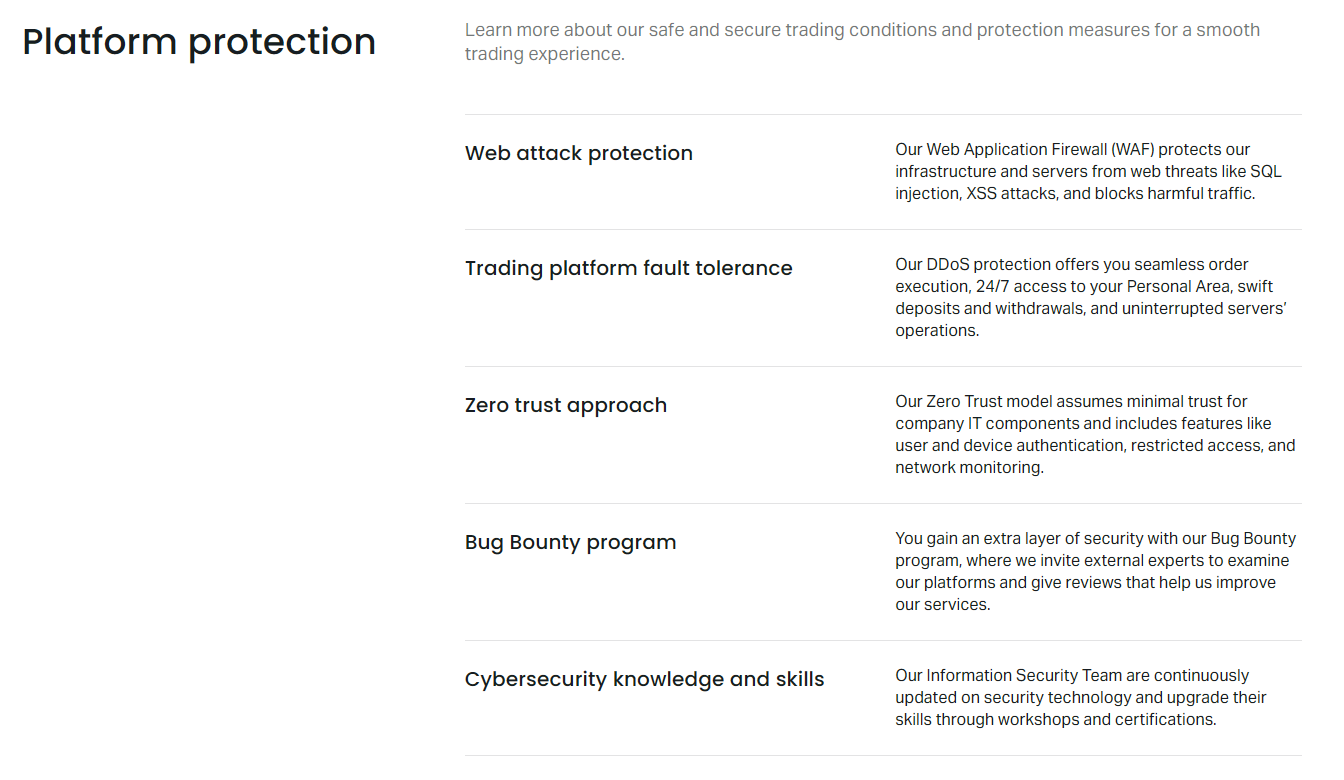
The platform protection overview shows how these features work together. Margin call warnings, stop out execution, and negative balance correction are all automated. The system is designed to be transparent — you can see your margin level in real time, review stop out history in your account statement, and verify that negative balances are corrected.
Margin Call Behavior on Different Platforms
Margin call and stop out logic is identical across MetaTrader 4, MetaTrader 5, Exness Web Terminal, and the Exness mobile apps because they all connect to the same Exness trading servers. The only differences are in how the information is displayed. MT4 and MT5 show margin level in the terminal window. The web terminal displays it in the account summary panel. The mobile app shows it on the main dashboard and in the account details screen.
One practical difference: on MT4 and MT5, you can add a margin level column to the trade tab for quick monitoring. On the web terminal, the margin level is always visible in the header. Mobile push notifications for margin calls can be enabled in the app settings. If you trade across multiple platforms, the margin level will be consistent because it is calculated server-side.
- MT4/MT5: margin level in terminal trade tab
- Web Terminal: margin level in account header
- Mobile app: margin level on dashboard and account screen
- Push notifications: configurable in app settings
- Email alerts: configurable in personal area
- All platforms: same server-side calculation
If you use expert advisors or copy trading, margin calls can still occur. The system does not distinguish between manual and automated trades. An EA that opens many positions or scales into losers can trigger a margin call just as easily as a discretionary trader. Copy trading followers should monitor the provider's margin usage, as a provider's margin call will affect copied positions proportionally.
Final Assessment of Exness Margin Call Rules
Exness margin call and stop out rules are more generous than most brokers. The 100% margin call warning level and 0% stop out level give you the maximum possible control over your positions before forced liquidation. This flexibility is valuable for traders who manage risk actively and want to decide themselves when to cut losses. However, it also means you can lose your entire account balance if you ignore warnings.
The dynamic leverage tiers and temporary margin increases around news events are standard industry practices, but they catch many traders off guard. The Exness trading calculator is the single most useful tool for staying ahead of these changes. Use it before every trade, enable margin alerts, and keep used margin well below 50% of equity. Those three habits will prevent the vast majority of margin calls.
Negative balance protection adds a final safety layer, but it should never be part of your trading plan. Treat the 0% stop out as a hard boundary you never intend to reach. If you find yourself regularly approaching margin call levels, the issue is position sizing or strategy, not the broker's rules. Reduce leverage, trade smaller lots, or increase account equity until you have a comfortable buffer.
Frequently Asked Questions
What is the margin call level on Exness?
The margin call level on Exness is 100% for all account types. This triggers when your account equity equals your used margin, meaning free margin reaches zero.
What is the stop out level on Exness?
The stop out level on Exness is 0% for most accounts. Positions are automatically closed only when equity falls to zero or below, starting with the largest losing position.
Does Exness have negative balance protection?
Yes, Exness provides negative balance protection on all account types. If a stop out results in a negative balance, Exness corrects it to zero at no cost to the client.
Can I trade after receiving a margin call?
You cannot open new positions after a margin call, but existing positions remain open. You can close positions manually, deposit funds, or hedge to restore margin level.
How does weekend leverage reduction affect margin?
Exness typically reduces maximum leverage to 1:200 over weekends. This increases used margin for open positions, which can trigger a margin call even without price movement.
Where can I check margin requirements before trading?
Use the Exness trading calculator in your personal area or web terminal. It shows required margin, pip value, and swap rates for any instrument and lot size.
Do margin call rules differ between MT4 and MT5?
No, margin call and stop out levels are identical across MT4, MT5, Web Terminal, and mobile apps because they use the same Exness trading servers.