

Trading Tools
Exness Trading Calculator: Complete Guide for Traders
Calculate position costs, required margin, and potential outcomes before you trade.

Senior Forex Trader & Market Analyst
Daniel Chen is an experienced forex trader and financial market analyst with over 15 years of experience in currency trading. He specializes in technical analysis, risk management, and developing practical trading strategies to help traders make informed decisions.
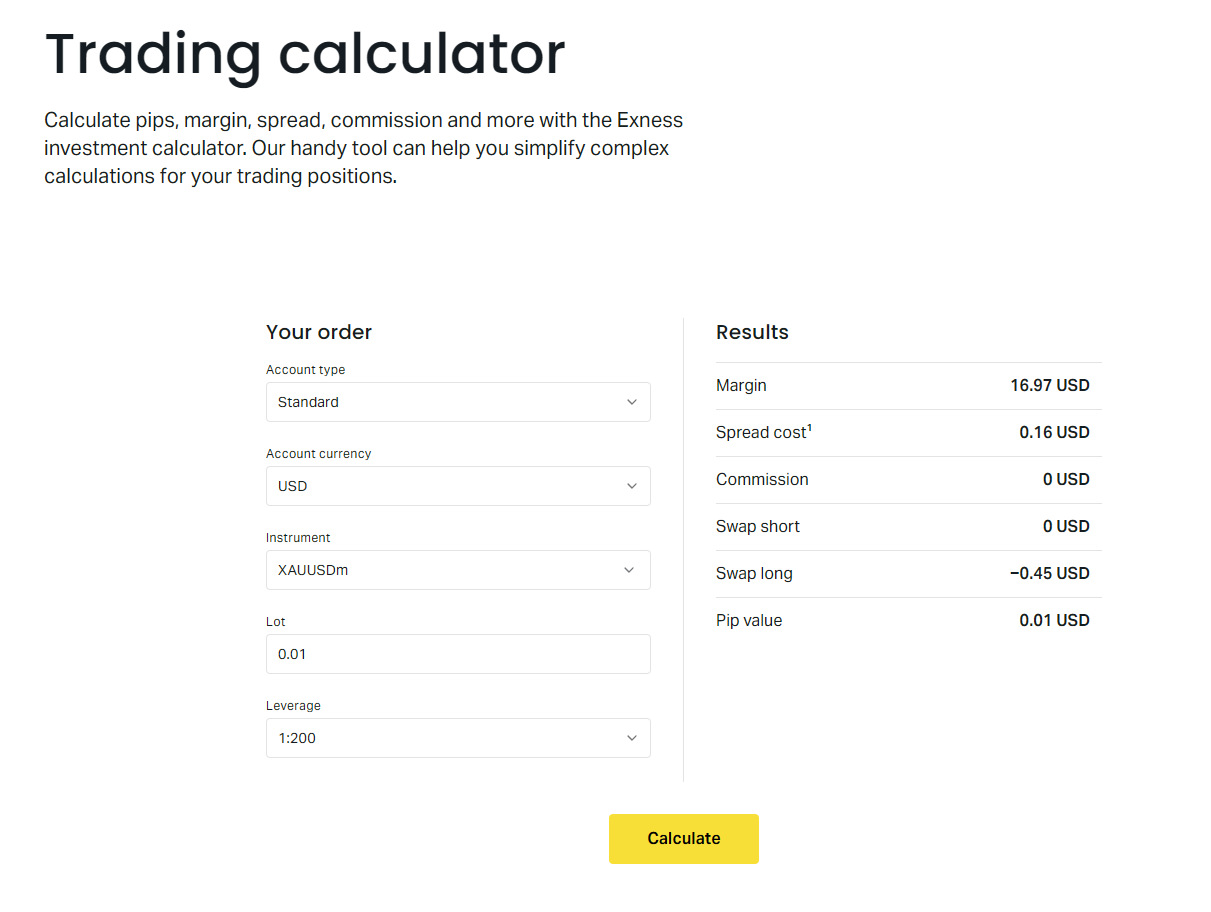
The Exness trading calculator sits in the personal area and on the public website, giving traders a quick way to estimate margin requirements, pip values, swap charges, and potential profit or loss before opening a position. It supports every instrument Exness offers — forex pairs, metals, energies, indices, stocks, and cryptocurrencies — and it adjusts automatically for the account type you select. This guide walks through each calculator section, explains the inputs that matter most, and shows how to interpret the results so you can size positions with confidence.
Contents
- 1. How to Access the Calculator
- 2. Understanding Each Input Field
- 3. Margin Calculation Explained
- 4. Pip Value and Point Value
- 5. Swap Estimation for Overnight Positions
- 6. Profit and Loss Projection
- 7. Instrument-Specific Nuances
- 8. Account Type Comparison in the Calculator
- 9. Using the Calculator for Position Sizing
- 10. Limitations of the Calculator
- 11. Mobile Access and App Integration
- 12. Practical Workflow for Daily Use
- 13. Common Mistakes to Avoid
- 14. Advanced Features and Hidden Options
- 15. Comparing Exness Calculator to Alternatives
- 16. Final Assessment of Exness Trading Calculator
Most traders open the calculator because they want to know how much margin a trade will lock up. That number changes with leverage, account currency, and the specific symbol. The calculator also reveals the pip value in your account currency, which is essential for risk management. If you trade gold or the US30 index, the pip definition differs from EURUSD, and the tool handles that conversion without manual math. Swap estimates appear for both long and short sides, helping you decide whether holding overnight makes sense.
Exness provides two calculator flavors: a compact widget on the website and a full version inside the personal area. The personal area version remembers your default account type and base currency, so you skip repetitive dropdown selections. Both versions pull live spreads and swap rates from the Exness pricing engine, so the numbers reflect current market conditions rather than static examples. You can still override leverage manually if you want to model a different scenario.
How to Access the Calculator
Log into your Exness personal area and click the calculator icon in the left navigation, or visit the public tools page without logging in. The public version defaults to a Standard account with 1:2000 leverage and USD base currency. After login, the tool pre-fills your actual account type — Standard, Standard Cent, Pro, Raw Spread, or Zero — and your registered base currency. That alone saves time when you compare multiple setups.
The calculator opens with four main input groups: instrument, account settings, position details, and optional price levels. Instrument search supports symbol names like EURUSD, XAUUSD, USOIL, BTCUSD, and US30. Account settings let you pick account type, leverage, and base currency. Position details take volume in lots and direction — buy or sell. Price fields accept entry, stop loss, and take profit levels for profit and loss projection.
Understanding Each Input Field
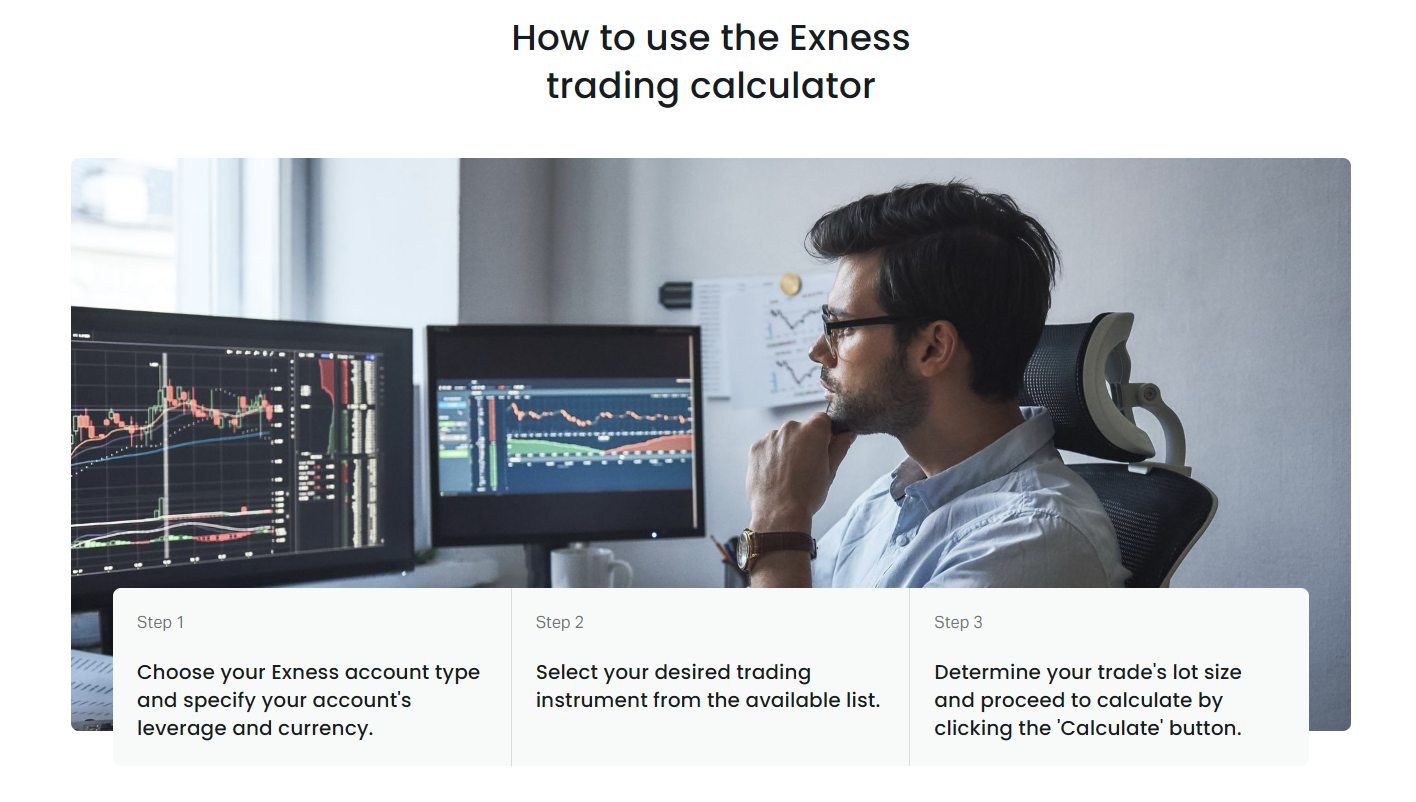
Instrument selection drives every downstream calculation. Forex pairs use standard lot sizes of 100,000 base currency units. Metals like gold and silver use 100 ounces per lot for XAUUSD and 5,000 ounces for XAGUSD. Energies, indices, stocks, and crypto each have their own contract specifications, which the calculator applies automatically. You do not need to memorize lot sizes; the tool handles the conversion.
Account type determines the spread and commission structure used in the calculation. Standard and Standard Cent accounts use spread-only pricing with no commission. Raw Spread and Zero accounts add a round-turn commission per lot, which the calculator includes in the cost estimate. Pro accounts sit in between with low spreads and no commission. Selecting the wrong account type will skew the projected cost, so verify this dropdown before running numbers.
Leverage caps the maximum position size relative to margin. Exness offers up to 1:2000 on Standard and Pro accounts, 1:200 on Raw Spread and Zero, and 1:2000 on Standard Cent. The calculator respects these caps. If you enter a volume that exceeds available margin at the chosen leverage, the margin field will show the required amount in red, signaling you cannot open that position with current equity.
Base currency converts all results into your account denomination. A trader with a EUR-denominated account sees margin, pip value, and swap in euros. The calculator uses the current EURUSD rate for conversion. This matters because pip value in EUR differs from pip value in USD for the same position, affecting risk-per-trade calculations.
Margin Calculation Explained
Margin equals the notional value of the position divided by leverage. For forex, notional value is volume in lots multiplied by contract size (100,000) multiplied by the current price of the base currency in account currency. For cross pairs like EURGBP on a USD account, the calculator routes through EURUSD and GBPUSD to get the correct conversion. The result appears in the margin field, labeled with your base currency.
Dynamic leverage reduces maximum leverage on large positions. Exness applies tiered leverage: the first $50,000 notional may use 1:2000, the next $200,000 drops to 1:1000, and so on. The calculator accounts for this automatically when you enter volume. You will see the effective leverage used for that specific position size, not just the account maximum. This prevents surprises when scaling up.
Scroll horizontally to see all columns
| Symbol | Volume (lots) | Leverage | Margin (USD) |
|---|---|---|---|
| EURUSD | 1.00 | 1:2000 | ~$50 |
| EURUSD | 1.00 | 1:500 | ~$200 |
| XAUUSD | 1.00 | 1:2000 | ~$100 |
| US30 | 1.00 | 1:200 | ~$1,750 |
| BTCUSD | 1.00 | 1:200 | ~$350 |
The table above shows approximate margin for one standard lot at typical prices. Actual values fluctuate with market price. Note that US30 and BTCUSD have lower maximum leverage, so margin jumps significantly compared to major forex pairs at the same nominal volume.
Pip Value and Point Value
Pip value tells you how much a one-pip move changes your account balance. For most forex pairs, a pip is the fourth decimal place (0.0001). For JPY pairs, it is the second decimal (0.01). For metals, indices, and crypto, the calculator uses point value instead — the profit or loss per one-point price change. One point on XAUUSD equals $1 per lot. One point on US30 equals $1 per lot. One point on BTCUSD equals $1 per lot.
The calculator displays pip value in your base currency. If your account is in EUR and you trade EURUSD, one pip on one lot equals 10 USD converted to EUR at the current rate. If you trade GBPUSD on an EUR account, the pip value in USD converts to EUR via EURUSD. This conversion happens in real time, so the pip value updates as you change the instrument or account currency.
Pip value is the bridge between price action and account equity. Know it before you size the trade.
Standard Cent accounts multiply pip value by 100 because one lot equals 1,000 units instead of 100,000. The calculator handles this automatically when you select Standard Cent. You will see pip values 100 times smaller than the same position on a Standard account, which matches the reduced contract size.
Swap Estimation for Overnight Positions
Swap — also called rollover — is the interest differential between the two currencies in a pair, plus the broker markup. Exness publishes daily swap rates for long and short positions. The calculator multiplies the swap rate by volume and converts to your base currency. Swap accrues at 22:00 UTC (server time) and triples on Wednesday to cover the weekend.
Swap can be positive or negative. Positive swap credits your account; negative swap debits it. For major pairs, swap is usually negative on both sides due to markup. For some cross pairs or exotic pairs, one side may carry positive swap. The calculator shows both long and short swap values so you can factor holding costs into trade planning.
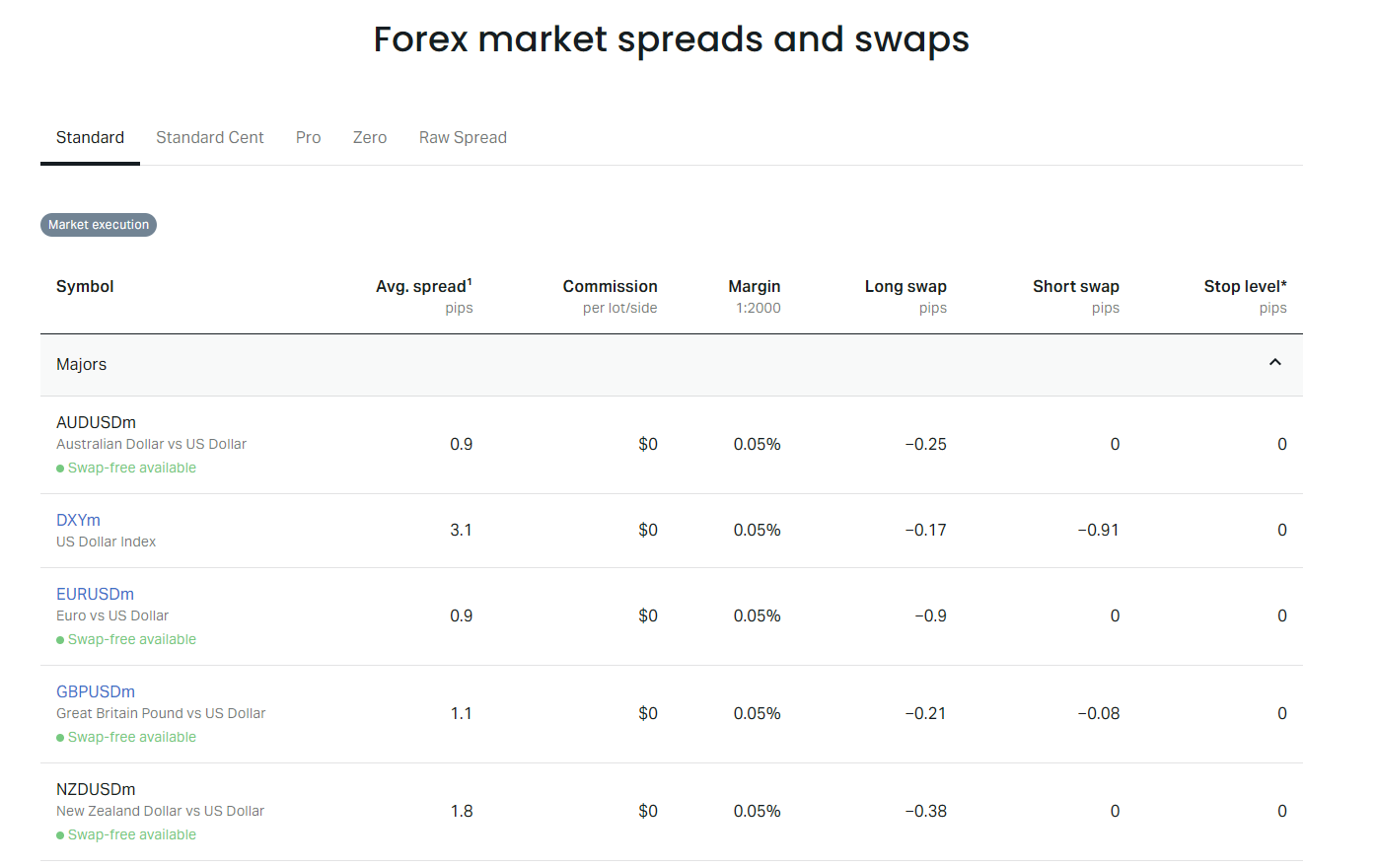
Swap-free accounts (Islamic accounts) show zero swap in the calculator when selected as the account type. However, Exness may apply an administration fee after a certain holding period for some instruments. The calculator does not model that fee; check the specific swap-free terms for instruments you plan to hold long term.
Profit and Loss Projection
Enter an entry price, stop loss, and take profit to see projected profit or loss in your base currency. The calculator computes the price difference in points, multiplies by point value and volume, then subtracts estimated spread cost and commission. For buy positions, profit equals (take profit minus entry) times point value times volume. For sell positions, profit equals (entry minus take profit) times point value times volume.
Spread cost uses the current average spread for the selected account type. Commission adds the round-turn fee for Raw Spread and Zero accounts. The result shows net profit or loss after these costs. This helps you evaluate risk-reward ratios before committing capital. If the projected loss at stop loss exceeds your risk tolerance, reduce volume or widen the stop.
Scroll horizontally to see all columns
| Scenario | Price Move (pips) | Gross P/L (USD) | Spread Cost | Net P/L (USD) |
|---|---|---|---|---|
| Take Profit Hit | +20 | +$100 | -$5 | +$95 |
| Stop Loss Hit | -10 | -$50 | -$5 | -$55 |
| Break Even | +1 | +$5 | -$5 | $0 |
The table assumes a 1-pip spread on a Standard account. Raw Spread would show a smaller spread cost but add commission. Adjust the numbers for your actual conditions. The calculator performs this math instantly when you fill the price fields.
Instrument-Specific Nuances
Forex majors behave predictably: 1 lot = 100,000 base units, pip = 0.0001, pip value ≈ $10 per lot on USD accounts. Cross pairs and exotics follow the same logic but may have wider spreads and higher swap. The calculator handles the conversions, but you should know that liquidity affects execution quality, which the tool does not model.
Gold (XAUUSD) uses 100 ounces per lot. One point (0.01) equals $1 per lot. Spreads are typically 15–30 points on Standard accounts. Swap on gold can be significant — often negative on both sides. The calculator reflects current gold swap rates, which change daily based on interest rate differentials and broker markup.
Indices like US30, US500, and USTEC trade in points, not pips. One lot equals $1 per point on US30. Margin requirements are higher because maximum leverage caps at 1:200. The calculator enforces this cap. Spreads on indices vary by session; the tool uses the current average spread for the selected account type.
Cryptocurrencies (BTCUSD, ETHUSD, etc.) also use point value. One lot of BTCUSD typically equals 1 Bitcoin, with point value of $1 per lot. Leverage caps at 1:200. Spreads are wider than forex — often $20–$50 on Standard accounts. Swap on crypto is usually negative on both sides and can be large. The calculator includes all these parameters.
The calculator knows the contract specs. You just need to pick the right symbol.
Account Type Comparison in the Calculator
Switching account type in the calculator instantly updates spread, commission, swap, and margin leverage caps. This is the fastest way to compare trading costs across Standard, Pro, Raw Spread, and Zero accounts for your specific strategy. Run the same position through each account type and note the net profit difference after spread and commission.
Scroll horizontally to see all columns
| Account Type | Spread (pips) | Commission (round turn) | Total Cost (USD) | Net Profit (USD) |
|---|---|---|---|---|
| Standard | 1.0 | $0 | $10 | $190 |
| Pro | 0.4 | $0 | $4 | $196 |
| Raw Spread | 0.1 | $7 | $8 | $192 |
| Zero | 0.0 | $10 | $10 | $190 |
The table uses illustrative spreads and commissions. Actual values vary by time of day and market conditions. Pro accounts often win on pure cost for high-volume traders. Raw Spread suits scalpers who value tight spreads and accept commission. Zero accounts eliminate spread uncertainty but charge the highest commission. Standard accounts remain simple with no commission — suitable for lower frequency trading.
Using the Calculator for Position Sizing
Position sizing starts with risk per trade — typically 1–2% of account equity. Divide your risk amount by the stop loss distance in pips, then divide by pip value per lot. The result is the maximum lot size. The calculator does not solve for volume automatically, but you can iterate: enter a volume, check the margin and pip value, adjust until the stop loss loss equals your risk budget.
Example: $10,000 account, 1% risk = $100. EURUSD stop loss 20 pips. Pip value per lot ≈ $10. $100 / (20 × $10) = 0.5 lots. Enter 0.5 lots in the calculator. Confirm margin fits your free margin. Confirm projected loss at stop loss shows ~$100. This manual iteration takes seconds and builds intuition for the relationship between volume, stop distance, and risk.
Position sizing is the only risk control you fully control. The calculator makes the math transparent.
For indices and crypto, replace pip value with point value and stop distance with points. The logic stays identical. The calculator displays point value per lot for each instrument, so you never guess the contract multiplier.
Limitations of the Calculator
The calculator uses current average spreads and swap rates. During high volatility — news releases, market open, geopolitical events — spreads widen beyond the average. The tool does not model slippage, requotes, or execution delays. It assumes the entry, stop loss, and take profit prices you enter are filled exactly. In fast markets, that assumption breaks.
Dynamic leverage tiers apply per account, not per position. If you already have open positions, the calculator does not know your used margin or remaining free margin. It calculates margin for the new position in isolation. You must check the personal area for aggregate margin usage.
Swap rates change daily. The calculator shows today's rate. A position held for weeks will experience different swap each day. The tool cannot project cumulative swap over an arbitrary holding period. For long-term trades, monitor swap in the personal area or the trading platform.
Mobile Access and App Integration
The Exness mobile app includes a calculator shortcut in the tools menu. It mirrors the personal area version — same inputs, same live data. You can run calculations on the go, then switch to the trading tab to execute. The app does not yet support saving calculator presets, so you re-enter parameters each session.
The web terminal also links to the calculator from the order ticket. Click the calculator icon next to the volume field to pre-fill the symbol and current price. This reduces manual entry errors when sizing a trade you are about to place.
Practical Workflow for Daily Use
Open the calculator before the session. Set your account type, leverage, and base currency once. For each setup you consider, enter the symbol, direction, and planned volume. Check margin — ensure free margin covers it with buffer. Check pip value — confirm stop loss risk matches your risk rule. Check swap — decide if overnight hold is acceptable. Enter entry, stop, take profit — verify risk-reward. If all numbers align, place the trade.
Save screenshots or notes of calculator outputs for your trading journal. The tool has no export function, but a quick screen capture preserves the assumptions behind each trade. This helps post-trade review when outcomes differ from projections.
- Set account defaults once per session
- Verify margin against free margin
- Match stop loss distance to risk budget
- Review swap for holding period
- Confirm risk-reward meets minimum threshold
- Capture settings for journal reference
Common Mistakes to Avoid
Selecting the wrong account type is the most frequent error. A trader on a Raw Spread account who leaves the calculator on Standard will underestimate costs by ignoring commission. Always confirm the account type dropdown matches your live account.
Forgetting base currency conversion leads to misreading pip value and margin. A GBP-denominated account trading EURUSD sees different numbers than a USD account. The calculator handles conversion, but you must notice the currency label on each output field.
Using maximum leverage as a target rather than a limit. The calculator shows required margin at your chosen leverage. Just because 1:2000 allows a large position does not mean your equity supports it. A small adverse move can trigger stop out. Size to risk, not to maximum leverage.
Ignoring spread widening at rollover or news. The calculator uses average spreads. During the 22:00–23:00 UTC rollover window, spreads on some pairs can triple. If your stop loss sits near the entry, a spread spike can hit it before price moves. Factor a spread buffer into stop placement.
Advanced Features and Hidden Options
The calculator accepts manual price entry for entry, stop loss, and take profit. You can paste prices from the platform or charts. It also accepts volume in decimal lots down to 0.01 (0.001 on Cent accounts). For position sizing, you can enter a risk amount in the volume field by trial and error — adjust volume until the projected loss at stop loss matches your risk target.
A lesser-known feature: the calculator updates swap rates in real time when you change the symbol. If you switch from EURUSD to XAUUSD, the long and short swap fields refresh instantly. This lets you compare overnight costs across instruments without leaving the page.
The personal area version remembers your last used settings in browser storage. If you always trade Pro account with 1:500 leverage and EUR base, those defaults persist across sessions. Clear browser cache to reset.
Defaults save time. But verify them after any account change — leverage adjustments, new account opening, base currency change.
Comparing Exness Calculator to Alternatives
Third-party calculators (Myfxbook, Investing.com, broker-agnostic tools) require manual entry of contract size, pip value, swap, and commission. They often use generic assumptions that do not match Exness-specific conditions — especially dynamic leverage tiers, account-type spreads, and Exness swap rates. The Exness calculator pulls live data from the same pricing engine that fills your orders.
MetaTrader 4 and 5 have built-in margin calculators in the order window. They show required margin for the volume you enter but do not project profit, loss, or swap. They also lack account-type spread differentiation. The Exness calculator is more complete for pre-trade analysis.
Scroll horizontally to see all columns
| Feature | Exness Calculator | MT4/MT5 Order Window | Third-Party Tools |
|---|---|---|---|
| Live Exness spreads | Yes | No | No |
| Account-type commissions | Yes | No | Manual |
| Dynamic leverage tiers | Yes | Partial | No |
| Swap rates (long/short) | Yes | No | Generic |
| Profit/loss projection | Yes | No | Yes |
| Base currency conversion | Yes | No | Manual |
For Exness traders, the native calculator remains the most accurate planning tool because it shares the same data source as the execution engine. External tools introduce assumption risk.
Final Assessment of Exness Trading Calculator
The Exness trading calculator does one thing well: it translates raw contract specifications and live pricing into the numbers that matter for position sizing — margin, pip value, swap, and projected profit or loss. It respects account-type differences, dynamic leverage tiers, and base currency conversion without requiring the trader to manage any of that manually. The interface is straightforward, the data is current, and the coverage spans every instrument Exness offers.
Its limitations are the limitations of any pre-trade model: it cannot predict spread widening, slippage, or cumulative swap drift over weeks. It does not know your aggregate margin usage across multiple positions. It does not export or save scenarios. For daily trading, these gaps are manageable — you check free margin in the personal area, you monitor swap in the platform, you journal your assumptions manually.
If you trade Exness, use this calculator before every trade. It takes ten seconds and prevents the most common sizing errors. The alternative — guessing margin or pip value — is how small accounts blow up on normal volatility. The calculator is free, accessible, and accurate enough for real decisions. That makes it essential, not optional.
Frequently Asked Questions
Does the calculator work for Standard Cent accounts?
Yes. Select Standard Cent in the account type dropdown. The calculator adjusts contract size (1,000 units per lot), pip value, and leverage caps automatically.
Can I calculate margin for multiple positions at once?
No. The calculator handles one position at a time. For aggregate margin, check the personal area dashboard or the trading platform.
Are the swap rates in the calculator guaranteed?
Swap rates update daily. The calculator shows the current rate. Actual swap charged at rollover may differ if rates change before 22:00 UTC.
Does the calculator include commission for Raw Spread and Zero accounts?
Yes. When you select Raw Spread or Zero, the calculator adds the round-turn commission per lot to the cost projection.
Can I use the calculator without an Exness account?
Yes. The public version on the Exness website works without login. It defaults to Standard account, 1:2000 leverage, USD base currency.
Why does my calculated margin differ from the platform?
The calculator computes margin for a single new position. The platform shows used margin for all open positions plus dynamic leverage tier effects across the entire account.
Does the calculator work for crypto trading on weekends?
Yes. Crypto markets trade 24/7. The calculator shows current spreads and swap for crypto symbols at any time.