

Forex Trading Education
Exness Stop Out Levels and Margin Protection Explained
A detailed guide to stop out mechanics, margin requirements, and risk management on Exness.

Senior Forex Trader & Market Analyst
Daniel Chen is an experienced forex trader and financial market analyst with over 15 years of experience in currency trading. He specializes in technical analysis, risk management, and developing practical trading strategies to help traders make informed decisions.
Stop out is one of those concepts that sounds abstract until it happens to your account. At Exness, the mechanism works similarly to other brokers but with specific thresholds that vary by account type. Understanding these levels isn't just about avoiding liquidation — it's about knowing exactly how much room your positions have before the broker steps in. This guide breaks down the numbers, the differences between account types, and the practical steps you can take to stay clear of automatic closure.
Contents
- 1. What Is Stop Out in Forex Trading
- 2. Exness Stop Out Levels by Account Type
- 3. How Margin Call Differs from Stop Out
- 4. Calculating Your Stop Out Threshold
- 5. Stop Out Behavior During High Volatility
- 6. Exness Zero Account Stop Out Specifics
- 7. Professional Account Stop Out Differences
- 8. Managing Positions to Avoid Stop Out
- 9. Using the Exness Margin Calculator
- 10. Stop Out History and Account Recovery
- 11. Negative Balance Protection and Stop Out
- 12. Comparing Exness Stop Out to Other Brokers
- 13. Practical Risk Management for Exness Traders
- 14. Final Assessment of Exness Stop Out Protection
Most traders learn about stop out the hard way. A position moves against them, margin drops, and suddenly the platform starts closing trades. Exness uses a margin-based system where the stop out level is expressed as a percentage of required margin. When your account equity falls to that percentage of used margin, the system begins closing positions — usually starting with the largest losing trade. The process continues until equity rises back above the threshold or all positions are gone.
What makes Exness different from some competitors is the transparency of these levels and the fact that they don't change based on market conditions. The stop out percentage is fixed per account type. That means you can calculate your exact buffer before you even open a trade. The broker also provides a margin calculator in the personal area and on the web terminal, which helps visualize how close you are to the line at any moment.
What Is Stop Out in Forex Trading
Stop out is the automatic liquidation of open positions when account equity drops to a specific percentage of used margin. It's a risk control mechanism that protects both the trader and the broker. Without it, a losing position could theoretically generate a negative balance, leaving the trader owing money to the broker. Most regulated brokers, including Exness, operate under rules that prevent negative balances for retail clients, so stop out acts as the final safety net.
The mechanism works in real time. As market prices move, your equity fluctuates. Used margin stays relatively constant unless you open or close positions. The ratio between equity and used margin is your margin level, expressed as a percentage. When that percentage hits the broker's stop out level, the system triggers. It's not a manual decision — it's algorithmic and instantaneous. You won't get a phone call or an email warning seconds before it happens.
Exness displays your current margin level in the trading terminal, the mobile app, and the personal area. It updates continuously. Watching this number during volatile sessions is one of the simplest ways to avoid surprises. A margin level of 500% means you have plenty of room. At 150%, you're getting close. At 100%, you're at the edge for some account types. The exact stop out percentage depends on which account you're using.
Exness Stop Out Levels by Account Type
Exness offers several account types, and each has its own stop out threshold. The Standard and Standard Cent accounts share the same level: 0%. That sounds unusual — most brokers set stop out at 20%, 30%, or 50%. A 0% stop out means the system will keep positions open until equity literally reaches zero. In practice, this gives traders maximum staying power, but it also means losses can exceed the account balance if the market gaps or moves violently during low liquidity. Exness does offer negative balance protection for retail clients, so you won't owe more than you deposited, but the account can still be wiped out completely.
Professional accounts — Raw Spread, Zero, and Pro — have a stop out level of 20%. This is more conservative. When equity falls to 20% of used margin, liquidation begins. The logic here is that professional clients typically use higher leverage and larger position sizes, so a tighter stop out reduces the risk of catastrophic loss. It also aligns with regulatory expectations for professional categorization.
The difference between 0% and 20% is substantial. On a Standard account with $1,000 equity and $200 used margin, your margin level is 500%. You could lose $999 before stop out triggers. On a Pro account with the same numbers, stop out would trigger when equity hits $40 (20% of $200). That's a much narrower window. Traders choosing between account types need to factor this in, not just spreads and commissions.
Scroll horizontally to see all columns
| Account Type | Stop Out Level | Margin Call Level | Negative Balance Protection |
|---|---|---|---|
| Standard | 0% | Not applicable | Yes (retail) |
| Standard Cent | 0% | Not applicable | Yes (retail) |
| Pro | 20% | 40% | Yes (retail) |
| Raw Spread | 20% | 40% | Yes (retail) |
| Zero | 20% | 40% | Yes (retail) |
Notice that Standard and Standard Cent accounts don't have a separate margin call level. The stop out at 0% effectively serves as both warning and action. For professional accounts, margin call at 40% gives you a heads-up — usually a notification in the terminal or app — before the 20% stop out kicks in. That extra buffer can be the difference between adding funds in time and watching positions close automatically.
How Margin Call Differs from Stop Out
Margin call and stop out are often confused. They're related but distinct events. A margin call is a notification. It tells you that your equity has fallen to a level where you should consider adding funds or reducing exposure. It does not close positions. Stop out is the enforcement action — it closes positions whether you like it or not. On Exness professional accounts, margin call triggers at 40% margin level. Stop out follows at 20%. On Standard accounts, there's no formal margin call because the stop out is at 0%.
The margin call notification appears in the trading terminal as a color change — typically the margin level text turns red or orange. In the Exness mobile app, you may also receive a push notification if you've enabled alerts. These warnings are helpful, but they're not guaranteed to arrive before stop out during extreme volatility. Price gaps over weekends or during major news events can jump straight past both levels in milliseconds.
Experienced traders treat margin call as a decision point, not a suggestion. When you see it, you have three realistic options: deposit more funds, close some positions manually, or hedge with opposite positions if your strategy allows. Doing nothing is a choice too — it means you're accepting that stop out will likely follow. The time between margin call and stop out varies. In calm markets, it could be hours or days. During a flash crash, it could be seconds.
Calculating Your Stop Out Threshold
Knowing the stop out percentage is only useful if you can translate it into actual price levels for your positions. The formula is straightforward: stop out triggers when equity equals the stop out percentage multiplied by used margin. Equity is balance plus floating profit or loss. Used margin is the sum of margin required for all open positions. Margin required per position depends on the instrument, lot size, leverage, and current price.
Let's work through an example. You have a Pro account with $5,000 balance. You open 2 lots of EURUSD at 1.0800 with 1:200 leverage. The margin requirement is (2 * 100,000 * 1.0800) / 200 = $1,080. Your used margin is $1,080. Stop out is at 20%, so the trigger equity is $216. That means you can sustain a floating loss of $5,000 - $216 = $4,784 before liquidation starts. At $10 per pip for 2 lots, that's about 478 pips of adverse movement.
The same position on a Standard account with 1:2000 leverage would require only $108 margin. Stop out at 0% means equity must hit $0. You could lose the full $5,000 balance before stop out. But remember — higher leverage means smaller price moves generate larger floating P&L swings. The 0% stop out doesn't make the account safer; it just changes where the line is drawn.
Exness provides a margin calculator that does this math automatically. You input the account type, leverage, instrument, and volume, and it shows required margin, pip value, and the price level where stop out would occur. It's available in the personal area and the web terminal. Using it before entering a trade takes thirty seconds and eliminates guesswork.
One detail that catches traders off guard: swap charges and commissions reduce equity too. If you hold positions overnight, daily swaps accumulate. On a tight margin situation, those few dollars per night can be the difference between surviving and stopping out. The calculator includes swap estimates, but actual rates change. Check the contract specifications for current swap values on your instruments.
Stop Out Behavior During High Volatility
Volatility changes everything. During normal sessions, price moves incrementally. Your margin level drifts down gradually. You see margin call, you have time to react. But during major news — NFP, CPI, central bank decisions — spreads widen, liquidity thins, and prices can gap. A position that was 50 pips from stop out can suddenly be 200 pips past it in a single tick. The system still executes at the stop out level, but the fill prices on the closing trades may be significantly worse than the theoretical trigger price.
Exness uses market execution for stop out orders. That means the closing trades are sent to the market at the best available prices. If the market is moving fast and liquidity is low, slippage occurs. This is standard industry practice, not unique to Exness. The only way to avoid it is to not be near stop out when volatility hits. That means either reducing position size ahead of known events or using wider stops manually so the account has more equity buffer.
Weekend gaps are another scenario. Markets close Friday evening and reopen Sunday evening (server time). If you hold positions over the weekend, Monday's open price can be far from Friday's close. Your margin level is calculated on the reopen price. If that price creates a large floating loss, stop out can trigger immediately at market open. Some traders close all positions before the weekend specifically to avoid this. Others reduce leverage or hedge. There's no perfect solution, but awareness prevents surprises.
The stop out level is a line in the sand. Volatility is the tide that can jump over it in a single wave.
Exness Zero Account Stop Out Specifics
The Zero account is popular for its tight spreads and commission-based pricing. It falls under the professional account category, so stop out is 20% with margin call at 40%. The commission per lot (typically $3.5 per side per lot on forex) is deducted from equity at trade open. That means your equity starts lower than your balance immediately after entering a position. For a 10-lot trade, that's $70 in commissions upfront. On a $1,000 account, that's 7% of equity gone before the market moves a pip.
This upfront commission deduction effectively reduces your stop out buffer. You need to account for it in your position sizing. The margin calculator includes commissions, but it's easy to forget when doing mental math. A trader who calculates based on balance alone will overestimate their staying power. Always use equity — balance plus floating P&L minus commissions — as your starting point.
The Zero account also offers higher maximum leverage (up to 1:2000 for forex) compared to Raw Spread and Pro (1:2000 as well, but with different margin requirements for some instruments). Higher leverage means lower used margin, which means a lower absolute equity trigger for stop out. But it also means each pip moves equity more. The net effect on stop out distance in pips depends on the specific trade parameters. Run the numbers in the calculator for your exact setup.
Professional Account Stop Out Differences
Pro, Raw Spread, and Zero accounts all share the 20% stop out and 40% margin call levels. But they differ in other ways that affect how quickly you approach those levels. Pro accounts have no commissions but wider spreads. Raw Spread has tight spreads and commissions. Zero has the tightest spreads and commissions. The spread width affects the immediate floating loss on entry. A 1-pip spread on EURUSD costs $10 per lot. A 0.1-pip spread costs $1. On a 20-lot position, that's $200 vs $20 — a meaningful difference in starting equity.
Swap rates also vary slightly between account types for some instruments. Over weeks or months, this compounds. A trader holding a long-term position on a Pro account might pay more in swaps than on a Raw Spread account, or vice versa. The difference is usually small per night but adds up. If you're trading near the margin call level, even a few dollars of daily swap can push you over the edge.
Another factor: professional accounts at Exness can access leverage up to 1:2000 on forex, but only if equity is below certain thresholds. As equity grows, maximum leverage steps down. This is a regulatory requirement. Lower leverage means higher used margin for the same position size, which raises the absolute equity level where stop out triggers. A trader who starts with 1:2000 leverage and grows their account may find their stop out buffer shrinking in absolute terms even if the percentage stays at 20%.
Scroll horizontally to see all columns
| Feature | Pro | Raw Spread | Zero |
|---|---|---|---|
| Stop Out | 20% | 20% | 20% |
| Margin Call | 40% | 40% | 40% |
| Commission | None | $3.5/lot/side | $3.5/lot/side |
| Typical EURUSD Spread | ~1.0 pip | ~0.1 pip | ~0.0 pip |
| Max Leverage (Forex) | 1:2000 | 1:2000 | 1:2000 |
Managing Positions to Avoid Stop Out
The most effective way to avoid stop out is position sizing. If you risk 1-2% of equity per trade and use a stop loss, you mathematically cannot hit stop out from a single position unless the market gaps past your stop. The danger comes from multiple losing positions, averaging down, or trading without stops. Exness allows hedging — opening opposite positions on the same instrument — which can lock in floating loss and prevent further margin erosion. But hedging doesn't reduce used margin; it doubles it. Both positions require margin. So hedging buys time but increases the total margin requirement.
Partial closing is another tool. If you have a large losing position, closing half reduces used margin proportionally and locks in half the loss. This raises your margin level immediately. The Exness terminal and app support partial closes with a few clicks. It's often better than waiting for stop out to close the whole thing at potentially worse prices.
Adding funds is the simplest fix but requires having spare capital available. Exness processes deposits instantly for most methods — cards, e-wallets, crypto. Bank wires take longer. If you're at margin call and decide to deposit, do it immediately. Don't wait for the market to turn. The time between margin call and stop out is not guaranteed.
Using the Exness Margin Calculator
The margin calculator is one of the most underused tools in the Exness ecosystem. It's not just for beginners. Professional traders use it to model scenarios before scaling in. You can access it from the personal area under 'Trading Tools' or directly in the web terminal. The interface lets you select account type, leverage, instrument, and volume. It outputs required margin, pip value, swap long/short, and the approximate price where stop out would occur.
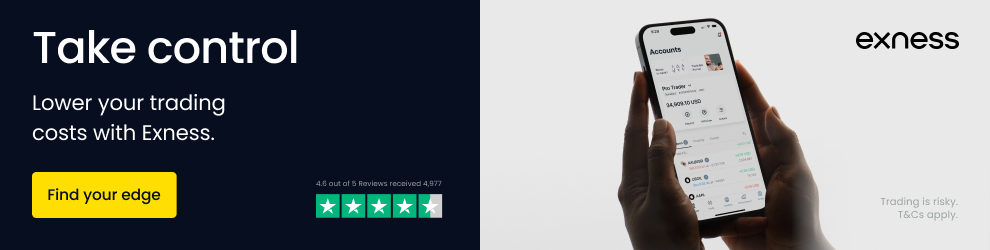
The stop out price estimate assumes no other open positions and no further deposits or withdrawals. It's a single-position view. For multiple positions, you need to calculate combined used margin and total floating P&L. The calculator doesn't aggregate automatically. But you can manually sum the used margin from each position (shown in the terminal) and use that as your total. Then calculate the equity trigger: total used margin * stop out percentage. Subtract that from current equity to get your remaining loss buffer in dollars. Divide by combined pip value to get buffer in pips.
The calculator also shows margin requirements for different leverage settings. This is useful when Exness adjusts your maximum leverage based on equity thresholds. If you're approaching a leverage step-down, you can see how much more margin the same positions will require. That helps you decide whether to reduce size proactively or accept the higher margin usage.
One limitation: the calculator uses current market prices. For weekend planning, you need to estimate where the market might open. Some traders use Friday's close plus a volatility buffer. Others check futures markets or Sunday evening opens on other platforms. There's no perfect predictor, but modeling a few scenarios (flat open, 50-pip gap, 100-pip gap) gives you a sense of risk.
Stop Out History and Account Recovery
After a stop out event, your account shows the closed positions in history with a specific comment — usually 'stop out' or 'so'. The remaining balance is whatever equity was left after the last position closed. On Standard accounts with 0% stop out, that's often near zero. On professional accounts, it's typically around 20% of used margin at the moment of liquidation, minus any slippage on the closing trades.
Exness does not charge a fee for stop out. The only costs are the spreads, commissions, and swaps already incurred, plus any slippage on the forced closure. There's no penalty fee. You can deposit again immediately and resume trading. The personal area shows a clear record of the event, which is useful for reviewing what went wrong. Look at the sequence: which position closed first, at what price, and how much equity remained after each closure.
Some traders ask if stop out affects their account standing or leverage eligibility. It doesn't. Exness doesn't downgrade accounts or restrict leverage based on past stop outs. However, repeated stop outs suggest a risk management problem that no broker setting can fix. The leverage step-downs are based solely on equity thresholds, not trading history. A professional client who hits stop out repeatedly keeps their professional status unless they request re-categorization or fail to meet the quantitative criteria on renewal.
Stop out is a symptom, not a disease. The disease is usually position sizing or lack of stop losses.
Negative Balance Protection and Stop Out
Exness offers negative balance protection for retail clients. This means if stop out executes but slippage leaves the account with a negative balance, Exness absorbs the loss and resets the balance to zero. You don't owe the broker money. This is a regulatory requirement for EU/UK clients under ESMA and FCA rules, and Exness extends it to other jurisdictions voluntarily. Professional clients do not automatically receive negative balance protection — it depends on the specific regulatory framework and the client agreement.
The protection applies after stop out. If the market gaps so violently that even the forced liquidation can't cover the used margin, the negative balance protection kicks in. This is rare but happened during the CHF unpegging in 2015 and during COVID volatility in 2020. Traders with 0% stop out on Standard accounts are more exposed to this scenario because positions stay open longer, accumulating larger floating losses before liquidation begins.
It's worth noting that negative balance protection doesn't prevent the loss of your deposited funds. It only prevents owing more than you deposited. Your account can still go to zero. The protection is a backstop, not a safety net that keeps you profitable.
Comparing Exness Stop Out to Other Brokers
Most brokers set stop out between 20% and 50%. A 50% stop out means liquidation starts when equity is half of used margin — a very tight leash. Exness Standard accounts at 0% are unusually generous. Professional accounts at 20% are in line with industry norms. The 0% level gives Standard account holders more staying power, but it also means they can lose 100% of equity before the broker intervenes. Some traders prefer the discipline of a higher stop out level because it forces earlier action.
Margin call levels also vary. Many brokers set margin call at 100% or 80%, giving substantial warning. Exness professional accounts at 40% margin call is relatively late. By the time you get the notification, you're already halfway to stop out. This makes proactive monitoring more important. Don't rely on the margin call alert as your primary risk signal.
Execution quality during stop out matters. Some brokers have been criticized for executing stop out orders at poor prices or with excessive slippage. Exness uses the same liquidity providers for forced closures as for regular market orders. There's no separate 'stop out engine' with worse pricing. But market conditions are what they are — if liquidity is thin, fills will be wide regardless of the broker.
Scroll horizontally to see all columns
| Broker Type | Typical Stop Out | Typical Margin Call | Exness Standard | Exness Professional |
|---|---|---|---|---|
| Conservative | 50% | 100% | 0% | 20% |
| Standard | 30% | 80% | 0% | 20% |
| Aggressive | 20% | 50% | 0% | 20% |
Practical Risk Management for Exness Traders
Stop out is the last line of defense. Your first line should be position sizing. A common rule: risk no more than 1-2% of account equity on any single trade. This means setting a stop loss at a level where, if hit, the loss equals 1-2% of equity. With this approach, you'd need 50-100 consecutive losing trades to hit stop out — statistically unlikely unless your strategy is fundamentally broken.
Correlation risk is often overlooked. Holding long EURUSD, long GBPUSD, and long AUDUSD simultaneously is essentially one trade with three times the position size. If USD strengthens, all three lose together. Your margin level drops three times as fast. Treat correlated positions as a single exposure for risk purposes. The Exness terminal shows correlation coefficients in the market watch window for major pairs.
Leverage is a tool, not a target. Just because 1:2000 is available doesn't mean you should use it. Higher leverage reduces used margin, which lowers the absolute equity trigger for stop out. But it also amplifies every pip movement. A 10-pip move on 10 lots at 1:2000 leverage changes equity by $1,000. At 1:100 leverage with 1 lot, the same 10-pip move changes equity by $100. The percentage impact on margin level is identical, but the psychological pressure differs. Many traders find lower leverage easier to manage emotionally.
Set up margin alerts in the Exness app. You can configure push notifications at specific margin levels — for example, at 200%, 150%, 100%. These act as early warnings well before the official margin call. The app also shows a margin level widget on the main screen. Keep it visible. Glance at it whenever you check prices.
Finally, keep a trading journal that includes margin level at entry and exit. Review it monthly. You'll often find patterns — certain times of day, certain instruments, certain position sizes where margin pressure builds. Awareness of those patterns is more valuable than any calculator.
Final Assessment of Exness Stop Out Protection
Exness stop out mechanics are transparent, consistent, and competitive. The 0% level on Standard accounts gives maximum flexibility but demands self-discipline. The 20% level on professional accounts aligns with industry standards and provides a clearer structural boundary. The lack of a formal margin call on Standard accounts means traders must monitor themselves. The 40% margin call on professional accounts helps but arrives late. The margin calculator is excellent and should be used before every trade. Negative balance protection for retail clients is a genuine safety net. Overall, the system works as advertised — but it only protects you if you understand where the lines are drawn and size your positions accordingly.
Frequently Asked Questions
What is the stop out level for Exness Standard accounts?
Exness Standard and Standard Cent accounts have a stop out level of 0%. This means positions remain open until equity reaches zero, though negative balance protection prevents owing more than deposited.
How does stop out differ between Standard and Professional accounts?
Standard accounts stop out at 0% margin level with no margin call. Professional accounts (Pro, Raw Spread, Zero) stop out at 20% with a margin call warning at 40%.
Does Exness charge a fee for stop out execution?
No. Exness does not charge a separate fee for stop out. Only standard trading costs (spreads, commissions, swaps) and any slippage on the forced closure orders apply.
Can I avoid stop out by hedging positions?
Hedging locks in floating loss but doubles used margin since both positions require margin. It buys time but increases total margin requirement. Partial closing is often more effective.
What happens to my account balance after stop out?
The remaining balance equals equity after the last position closes. On Standard accounts this is often near zero. On Professional accounts it's typically around 20% of used margin at liquidation, minus slippage.
Does negative balance protection apply to all Exness clients?
Negative balance protection applies to retail clients automatically. Professional clients may not have this protection depending on their jurisdiction and agreement terms.
How can I calculate my exact stop out price?
Use the Exness margin calculator in the personal area or web terminal. Input account type, leverage, instrument, and volume to see required margin and estimated stop out price level.
Will a stop out affect my leverage or account status?
No. Exness does not restrict leverage or downgrade accounts based on stop out history. Leverage step-downs are based only on equity thresholds, not trading history.