

Trading Tools & Calculators
Exness Calculator: Complete Guide to Trading Tools
A practical breakdown of every calculator function with real examples and usage tips.

Senior Forex Trader & Market Analyst
Daniel Chen is an experienced forex trader and financial market analyst with over 15 years of experience in currency trading. He specializes in technical analysis, risk management, and developing practical trading strategies to help traders make informed decisions.
The Exness calculator sits inside the broker's personal area and on the public website, giving traders a quick way to estimate the numbers that matter before placing a trade. It covers margin requirements, pip values, potential profit or loss, swap charges, and currency conversion. The tool works across all account types — Standard, Standard Cent, Pro, Raw Spread, and Zero — and supports every instrument Exness offers, from major forex pairs to cryptocurrencies.
Contents
- 1. Margin Calculator Mechanics
- 2. Pip Value Calculator Details
- 3. Profit and Loss Projection
- 4. Swap Calculator for Overnight Costs
- 5. Currency Converter Utility
- 6. Calculator Access Points
- 7. Account Type Differences in Calculations
- 8. Instrument-Specific Behaviors
- 9. Risk Management Applications
- 10. Common Calculation Mistakes
- 11. Comparing Exness Calculator to Alternatives
- 12. Mobile App Calculator Limitations
- 13. Calculator Data Freshness and Accuracy
- 14. Advanced Usage: Multi-Leg Position Planning
- 15. Final Assessment of Exness Calculator
Most traders open the calculator when they need to know how much margin a position will lock up or what a one-pip move means in their account currency. The interface asks for the account type, instrument, lot size, leverage, and direction. Once those fields are filled, the results appear instantly. No login is required for the public version, though the personal area version can pre-fill your account defaults.
This guide walks through each calculator module, explains the inputs that drive the numbers, and shows how to interpret the output for better position sizing and risk management. It also covers the currency converter, which is handy when your account base currency differs from the instrument's quote currency.
Margin Calculator Mechanics
The margin calculator tells you how much free margin a trade will consume. It uses the formula: margin = (contract size × lot size × market price) ÷ leverage. Contract size varies by instrument — 100,000 units for standard forex lots, 100 for gold, 10 for US oil, and so on. The calculator pulls the current market price automatically, but you can override it to test hypothetical entry levels.
Leverage is the variable that changes the result most dramatically. Exness offers dynamic leverage up to 1:2000 on certain accounts, but the calculator respects the leverage caps that apply to your equity bracket. If your account equity exceeds $1,000, maximum leverage drops to 1:2000; above $5,000 it falls to 1:1000; above $30,000 to 1:500. The calculator applies these tiers automatically when you select your account type.
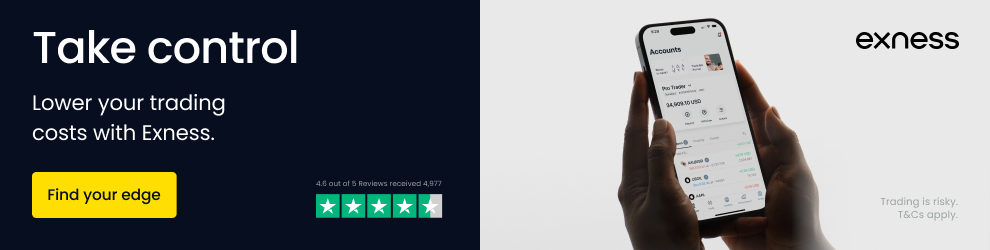
- Select account type to apply correct leverage limits
- Choose instrument — forex, metals, energies, indices, stocks, crypto
- Enter lot size (0.01 to 200 lots depending on instrument)
- Set leverage or leave on auto for account default
- Pick buy or sell — margin is identical for both directions
- Read required margin in your account base currency
A practical example: trading 1 lot of EURUSD on a Pro account with 1:500 leverage at 1.0850 requires $217 margin. The same position on a Standard Cent account with 1:2000 leverage needs only $5.43 because the contract size is 1,000 units instead of 100,000. The calculator makes these differences obvious without manual math.
The margin result updates in real time as you adjust any field. This lets you quickly find the maximum position size your free margin can support. Type in your available free margin, then increase lot size until the required margin matches. That number is your theoretical max position — though prudent risk management suggests using far less.
Pip Value Calculator Details
Pip value shows how much a one-pip price change adds or subtracts from your position in account currency. For most forex pairs, a pip is 0.0001; for JPY pairs it's 0.01; for metals and crypto the definition varies. The calculator handles these differences automatically based on the selected instrument.
The formula is straightforward: pip value = (pip size × lot size × contract size) ÷ current price × conversion rate. The conversion rate applies when the instrument's quote currency differs from your account currency. If your account is in USD and you trade EURUSD, no conversion is needed. If your account is in EUR and you trade GBPUSD, the calculator converts the USD pip value to EUR at the current EURUSD rate.
Scroll horizontally to see all columns
| Instrument | Lot Size | Account Currency | Pip Value |
|---|---|---|---|
| EURUSD | 1.00 | USD | $10.00 |
| GBPJPY | 1.00 | USD | $9.20 |
| XAUUSD | 1.00 | USD | $1.00 |
| US30 | 1.00 | USD | $0.10 |
| BTCUSD | 1.00 | USD | $0.01 |
Notice how pip value changes with the instrument. Gold moves $1 per pip per lot, while the US30 index moves only 10 cents. Crypto pip values are tiny because a pip represents a 0.01 price change on assets trading in the tens of thousands. The calculator normalizes all of this so you can compare risk across markets directly.
Profit and Loss Projection
The profit calculator combines pip value with your expected price movement. Enter the open price, close price, and direction. The result shows gross profit or loss before commissions and swaps. This is useful for setting take-profit and stop-loss levels that align with your risk-reward targets.
Commissions are not included in the basic profit calculation. Raw Spread and Zero accounts charge commission per lot per side — typically $3.50 per side per lot on forex. The calculator has a separate commission field you can enable. Swap charges also accumulate overnight and are excluded from the simple profit projection.
- Set open price — current market or planned entry
- Set close price — target or stop level
- Choose buy or sell
- Enable commission field for Raw Spread/Zero accounts
- Read gross P/L in account currency
- Subtract estimated swap if holding overnight
Example: buy 0.5 lots EURUSD at 1.0850, target 1.0900. That's 50 pips × $5 per pip = $250 gross profit. On a Raw Spread account, commission is $3.50 × 2 sides × 0.5 lots = $3.50. Net before swap: $246.50. If the trade stays open past 22:00 server time, add or subtract the swap rate shown in the specification.
Swap Calculator for Overnight Costs
Swap — also called rollover — is the interest differential between the two currencies in a forex pair, plus the broker's markup. It applies when a position is held past the daily cutoff (22:00 UTC+0 in winter, 21:00 UTC+0 in summer). The swap calculator shows the daily charge or credit for a given position size.
Swap rates differ for long and short positions. They also vary by account type. Standard and Pro accounts use the same swap rates. Raw Spread and Zero accounts often have different swap values because the commission structure changes the broker's cost model. The calculator pulls the current swap rates from the instrument specification automatically.
Scroll horizontally to see all columns
| Pair | Long Swap (points) | Short Swap (points) | Daily Cost per Lot (USD) |
|---|---|---|---|
| EURUSD | -12.5 | 4.2 | -$1.25 / +$0.42 |
| GBPUSD | -9.8 | 2.1 | -$0.98 / +$0.21 |
| USDJPY | 3.5 | -14.0 | +$0.35 / -$1.40 |
| AUDUSD | -4.2 | -1.8 | -$0.42 / -$0.18 |
| XAUUSD | -25.0 | 8.0 | -$2.50 / +$0.80 |
Positive swap means you earn interest; negative means you pay. The calculator converts points to your account currency. For a 1 lot EURUSD long position, you pay $1.25 per night. Over a week that's $8.75 — small but not negligible for larger positions or longer holds. Wednesday swaps are tripled to account for the weekend.
Currency Converter Utility
The currency converter is a standalone tool that converts any amount between two currencies at the current Exness rate. It's useful when you deposit in one currency but trade instruments quoted in another, or when you want to know the exact value of a withdrawal in your local currency.
The converter uses Exness's internal rates, which include a small spread over the interbank midpoint. This spread is typically tighter than retail bank rates but wider than raw interbank. The tool shows the rate, the spread in pips, and the final converted amount. No fees are charged for the conversion itself — the cost is embedded in the rate.
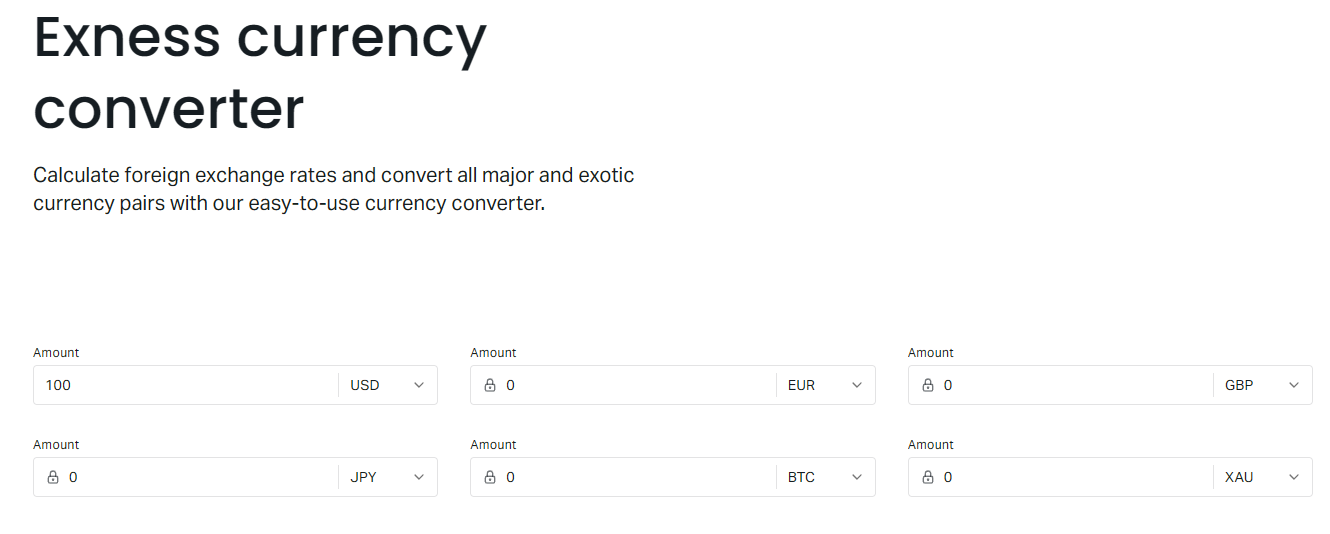
A practical scenario: your account is in USD but you want to withdraw €5,000 to a euro bank account. Enter 5,000 EUR, select USD as the target, and the converter shows how many dollars will be debited. The rate updates every few seconds during market hours. On weekends, the last Friday close rate applies.
Calculator Access Points
You can reach the calculator three ways. The public website version at exness.com/calculator requires no login and works with default settings. The personal area version pre-fills your account type, leverage, and base currency. The mobile app includes a simplified calculator under the trading tools menu. All three use the same backend engine and rates.
- Public web calculator — anonymous, full features
- Personal area calculator — pre-filled with your account data
- Mobile app — streamlined for quick checks on the go
- MT4/MT5 — no built-in calculator, use external or web version
The personal area version is most convenient for active traders. It remembers your last used settings and can calculate margin for multiple positions simultaneously. The public version is better for comparing account types side by side since you can switch the account type dropdown freely.
Account Type Differences in Calculations
Each Exness account type has distinct trading conditions that affect calculator outputs. Standard and Standard Cent accounts are commission-free with wider spreads. Pro accounts offer tighter spreads with no commission. Raw Spread and Zero accounts charge commission but provide the tightest spreads — often zero on major pairs during liquid hours.
Scroll horizontally to see all columns
| Account Type | Spread (EURUSD) | Commission | Max Leverage | Contract Size |
|---|---|---|---|---|
| Standard | ~1.0 pip | None | 1:2000 | Standard |
| Standard Cent | ~1.0 pip | None | 1:2000 | Cent (1,000 units) |
| Pro | ~0.4 pip | None | 1:2000 | Standard |
| Raw Spread | ~0.0 pip | $3.50/lot/side | 1:2000 | Standard |
| Zero | ~0.0 pip | $3.50/lot/side | 1:2000 | Standard |
The calculator does not automatically include spread cost in profit projections. You must account for it manually: spread in pips × pip value × lots. For a 1 lot EURUSD trade on a Standard account, that's roughly 1 pip × $10 = $10 round-trip spread cost. On Raw Spread, the spread cost is near zero but commission adds $7 round-trip.
Instrument-Specific Behaviors
Different asset classes have unique calculator behaviors. Forex pairs use standard pip definitions. Metals like gold and silver quote in USD per ounce with a pip of 0.01. Energies (oil, gas) use contract sizes of 1,000 barrels or 10,000 MMBtu. Indices have fixed tick values per contract. Stocks and crypto trade in share/coin units with no leverage on some account types.
- Forex: 100,000 units per lot, pip = 0.0001 (0.01 for JPY)
- Metals: 100 oz (gold), 5,000 oz (silver), pip = 0.01
- Energies: 1,000 barrels (oil), 10,000 MMBtu (gas)
- Indices: fixed contract value per point, varies by index
- Stocks: 1 share per lot, leverage often 1:20 max
- Crypto: 1 coin per lot, leverage up to 1:400 on Pro
The calculator adjusts contract size, pip definition, and leverage limits automatically when you switch instruments. This prevents the common error of applying forex lot logic to gold or indices. Always verify the contract size shown in the calculator matches the specification page for that instrument.
Crypto instruments deserve special attention. They trade 24/7 with no daily close, so swap accrues continuously rather than at a fixed cutoff. The calculator shows daily swap but the actual charge is calculated per minute. Spreads on crypto are wider and more volatile — the calculator uses the current spread but it can widen significantly during low liquidity.
Risk Management Applications
The calculator's real value emerges when you use it for position sizing. Start with your risk rule — say 2% of equity per trade. If your account has $5,000, that's $100 risk. Determine your stop-loss distance in pips. Divide risk by (stop pips × pip value) to get the maximum lot size. The calculator lets you verify this by entering the lot size and checking the margin and pip value.
Example: $5,000 account, 2% risk = $100. EURUSD trade with 30-pip stop. Pip value for 1 lot = $10. Max lots = $100 ÷ (30 × $10) = 0.33 lots. Enter 0.33 lots in the calculator. Margin required at 1:500 leverage ≈ $71. Free margin after trade ≈ $4,929. The position fits comfortably.
Common Calculation Mistakes
Traders often misread the calculator by confusing lot size with contract size, forgetting commission on Raw Spread accounts, or using the wrong leverage tier. Another frequent error: calculating position size based on equity instead of free margin. The calculator shows required margin — compare that to free margin, not equity.
- Using equity instead of free margin for position sizing
- Ignoring commission on Raw Spread and Zero accounts
- Forgetting swap costs for multi-day holds
- Applying forex pip values to metals or indices
- Overlooking leverage reductions at higher equity brackets
- Not converting pip value when account currency differs
The leverage bracket issue catches many traders off guard. You might calculate with 1:2000 leverage, but if your equity grows past $1,000, the maximum drops to 1:1000. The calculator applies the correct tier for your current equity when used in the personal area. The public version defaults to the highest available — adjust manually if needed.
A calculator is only as good as the inputs you give it. Wrong leverage, wrong account type, or ignoring commission turns a risk management tool into a false confidence generator.
Comparing Exness Calculator to Alternatives
Third-party calculators like Myfxbook, Forex Factory, or broker-agnostic tools exist. They often offer more features — position size calculators with risk percentage inputs, correlation matrices, or Monte Carlo simulators. The Exness calculator wins on integration: it uses live Exness spreads, swaps, and leverage rules without manual entry.
Scroll horizontally to see all columns
| Feature | Exness Calculator | Third-Party Tools |
|---|---|---|
| Live Exness spreads | Yes | No (manual entry) |
| Account-specific leverage | Yes (personal area) | No |
| Swap rates | Current Exness rates | Often outdated |
| Commission inclusion | Manual field | Sometimes built-in |
| Position size from risk % | No | Often yes |
| Multi-position margin | Yes (personal area) | Rarely |
For quick checks before a trade, the Exness calculator is faster and more accurate for Exness conditions. For portfolio-level planning or backtesting, a spreadsheet or dedicated risk tool works better. Many traders use both: Exness calculator for execution sizing, external tools for strategy design.
Mobile App Calculator Limitations
The Exness mobile app includes a calculator but it's stripped down. It covers margin, pip value, and profit for forex only. Metals, energies, indices, stocks, and crypto are not available in the app version. Swap and currency converter are also missing. For full functionality on mobile, use the browser version of the personal area or the public website.
- Forex pairs only — no metals, indices, crypto
- No swap calculator
- No currency converter
- No commission field
- Leverage defaults to account max
- Use browser for full feature set
This limitation matters if you trade multiple asset classes from your phone. The app calculator is fine for quick forex margin checks, but you'll need the web version for anything else. Exness has not announced plans to expand the mobile calculator feature set.
Calculator Data Freshness and Accuracy
The calculator pulls market prices, spreads, and swap rates from Exness's live feed. Price updates occur every few hundred milliseconds during market hours. Spread values reflect the current bid-ask spread, which widens during news events and low liquidity. Swap rates update daily around the rollover cutoff.
There is a small delay between the calculator display and the actual execution environment. In fast markets, the spread you see in the calculator may differ from the spread at the moment your order hits the server. The calculator is a planning tool, not a guarantee of execution conditions.
Treat calculator outputs as estimates within a range. The actual cost of a trade includes slippage, spread at execution time, and any latency between your decision and order arrival.
Advanced Usage: Multi-Leg Position Planning
The personal area calculator can handle multiple positions simultaneously. Add each leg — instrument, direction, lot size — and it sums the total margin requirement. This is essential for hedged positions, correlated pairs, or basket trades where you need to know the combined margin impact before executing.
Hedged positions on Exness use a 50% margin discount for the overlapping volume. If you're long 1 lot EURUSD and short 1 lot EURUSD, the calculator shows margin for 0.5 lots total. For partially hedged positions — long 1 lot, short 0.3 lots — it calculates margin on the net 0.7 lots plus 50% of the hedged 0.3 lots. The math is automatic.
- Add multiple rows for each position leg
- Calculator applies hedged margin discount automatically
- Shows total margin, free margin after, and margin level
- Useful for correlation hedges (EURUSD + GBPUSD)
- Export or screenshot for trade plan documentation
This feature saves significant time compared to manual hedged margin calculations. It also prevents the common error of forgetting that hedged margin only applies to the overlapping volume, not the full position size.
Final Assessment of Exness Calculator
The Exness calculator is a solid, integrated tool that covers the essential math traders need: margin, pip value, profit, swap, and currency conversion. Its strength lies in using live Exness conditions — spreads, swaps, leverage tiers, and account-specific rules — without manual data entry. The personal area version adds multi-position support and pre-filled defaults. The main gaps are the limited mobile app version and the lack of a built-in position size from risk percentage feature. For most Exness traders, the web calculator handles 90% of pre-trade calculations accurately and quickly. Keep a spreadsheet for portfolio-level risk modeling, but rely on the calculator for execution-level sizing.
Frequently Asked Questions
Does the Exness calculator include commission in profit calculations?
No, the basic profit calculator shows gross profit only. You must enable the commission field manually for Raw Spread and Zero accounts, or subtract commission separately.
Can I use the calculator without an Exness account?
Yes, the public version at exness.com/calculator works without login. It uses default settings for account type and leverage.
Why does my margin calculation differ from the terminal?
The calculator uses current market prices and your selected leverage. The terminal uses the exact execution price and your account's actual leverage tier, which may differ if your equity crosses a bracket threshold.
Does the calculator work for cryptocurrency trading?
Yes, the web and personal area calculators support all crypto instruments Exness offers. The mobile app calculator does not include crypto.
How often are swap rates updated in the calculator?
Swap rates update daily around the rollover cutoff (22:00 UTC+0 winter, 21:00 UTC+0 summer). The calculator pulls the current rates automatically.
Can I calculate margin for hedged positions?
Yes, the personal area calculator supports multiple position rows and applies the 50% hedged margin discount automatically for overlapping volumes.
Is the currency converter rate the same as my deposit/withdrawal rate?
The converter shows the current Exness internal rate. Actual deposit and withdrawal conversions use the rate at the moment of processing, which may differ slightly due to timing.